Organizing PDF pages means changing a document’s page structure — reordering, rotating, duplicating, deleting, or inserting blank pages — without altering the content inside each page. Lemmafour does this in your browser, so the file is never uploaded.
Use Organize pages locally when you need to fix the structure of a document before sending it out. The workflow is:
- Choose Organize pages locally.
- Open one PDF.
- Use the page grid to reorder, rotate, duplicate, delete, or insert blank pages.
- Review the final order in the grid.
- Apply the changes and download the organized PDF.
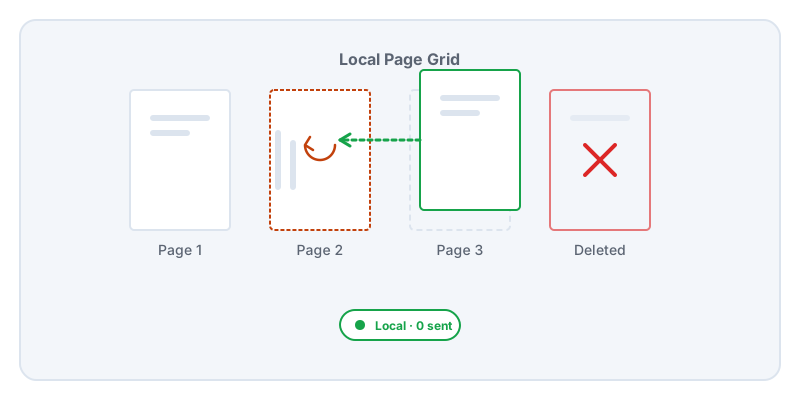
Page organization is the most common form of PDF cleanup. A packet scanned at an office printer might have sideways pages, blank backsides, or exhibits completely out of sequence. To fix these issues, you need a visual grid to drag pages into the right order and apply basic operations like rotation and deletion.
The standard way to solve this online is to upload your document to a processing server. That server reads the file, renders the thumbnails for your screen, accepts your reorder commands, and builds the final PDF before sending it back down to you.
For legal filings, medical packets, and financial statements, that process adds unnecessary exposure. Lemmafour avoids the server entirely. When you open the file, your browser renders the page thumbnails directly on your device. When you drag a page to a new position, your browser calculates the structural change. When you apply the changes, your device builds the organized output.
You can watch this happen. If you open the Local - 0 sent panel or your browser’s Network tab, you will see that your document is never transmitted over the internet.
Because page organization alters the structure of the document, you should review the final file carefully. If you move a page in a legal filing, confirm that it still aligns with any printed page numbers or table of contents. Page operations preserve the content of the pages, but they cannot automatically update internal references.
Remember that removing a page is not the same as redaction. Deleting a page removes the entire page from the output. If you keep a page but it contains sensitive information, deleting other pages does not protect the one you kept. Use Secure redaction for those specific text cleanups.