Preparing a PDF for printing means checking it for print risks — mixed page sizes, wrong orientation, missing margins — and fixing them before it reaches a printer. Lemmafour’s Print Doctor analyzes the file in your browser, with nothing uploaded.
Use Open Print Doctor when you are preparing a document for professional printing, or when a home printer is cutting off the edges of your file. The workflow is:
- Choose Open Print Doctor.
- Open the PDF.
- Select Doctor in the toolbar if needed.
- Review page size, orientation, margin, and color warnings.
- Apply any needed fixes with Crop, Rotate, Organize, or Export.
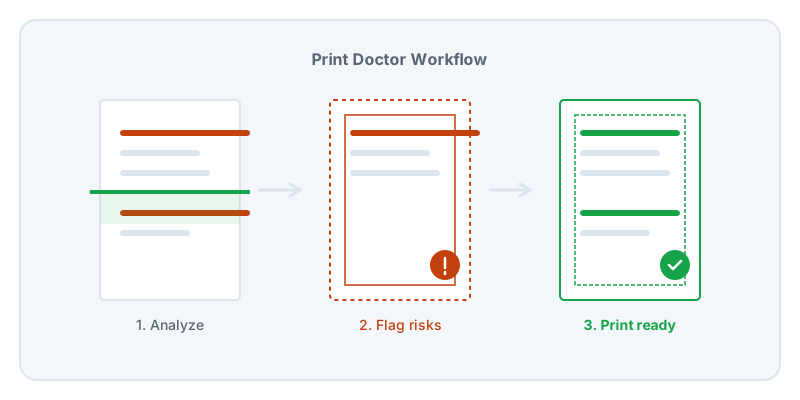
A PDF looks the same on every screen, but that does not mean it will print the same on every printer. A document might contain pages of different sizes, text that extends too close to the paper edge, or colors designed for a screen rather than ink. When you send a file like that to a print shop, they will either reject it or print it exactly as provided, resulting in cut-off text or unexpected blank space.
Print Doctor scans the internal structure of your PDF to flag these physical risks. It reads the dimensions of every page to warn you if you have a mix of A4 and US Letter sizes, which can cause a printer to stall waiting for the right paper. It checks the content boundaries to see if critical text or images sit in the non-printable margin (the bleed edge).
Once you know the issues, you can fix them using the editor’s other tools. If the margins are too wide, you can use Crop. If a scanned page is sideways, you can Rotate it.
Because print checks require reading the entire structure of your document, privacy is a major concern for legal or financial packets. Sending a sensitive document to an online print checker exposes it to a third party. Lemmafour runs Print Doctor entirely in your browser. Your device performs the analysis, generates the warnings, and applies your corrections.
Always export the final file and open it in your standard PDF viewer to verify the fixes before you send it to the print shop. If you are printing a large run, print a single test copy first.