Architecture documents have a peculiar problem. The version a customer, auditor or partner should see and the version your own engineers need overlap almost entirely — and differ in exactly the places that matter most.
The interfaces, the component flow, the operational model: shared. The threat assumptions, the private endpoints, the capacity ceiling you have not fixed yet, the subsystem everyone knows is fragile: not shared.
Maintaining that as two documents is how public documentation ends up describing a system that no longer exists.
One source, two audiences
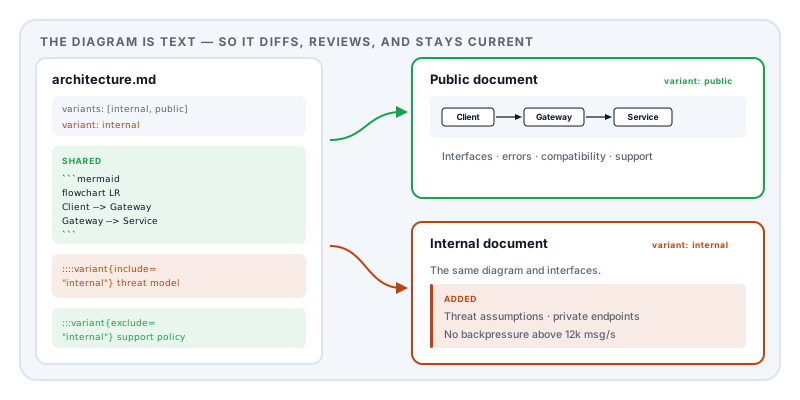
Markdown to PDF generates both from a single file. Declare the versions in the frontmatter:
---
title: Ingest Service Architecture
author: Platform Engineering
date: 2026-08-14
version: "2.1"
template: specification
variants: [internal, public]
variant: internal
toc: true
headingNumbers: true
---
The specification template and the Architecture document recipe are professional choices that require a Day Pass or Pro. The same Markdown structure, diagrams, code listings, and manual variant switching still work in a free core template such as report.
Then fence the internal material:
::::variant{include="internal"}
:::callout{kind=warning}
The ingest queue has no backpressure above 12k msg/s. Failure mode is
silent drop, not rejection. Mitigation is scheduled for Q4.
:::
::::
And the reverse, for content the public document needs and the working copy does not:
:::variant{exclude="internal"}
Support channels, compatibility guarantees, and deprecation policy.
:::
Switch variant and export. The architecture section is identical in both, because it is the same text.
Diagrams that live in the diff
The strongest argument for text-based documentation is what happens to the diagrams.
Mermaid diagrams are written as text and rendered as vector graphics:
:::figure{#fig:architecture caption="Primary component flow" alt="Client sends a request to the service, which reads the data store"}
```mermaid
flowchart LR
  Client --> Gateway
  Gateway --> Service
  Service --> Store[(Data store)]
  Service --> Queue[[Ingest queue]]
```
:::
Renaming a component is a one-line edit that appears in a pull request diff and can be reviewed like code. Compare that with the usual arrangement, where the diagram is a PNG exported from a drawing tool that one person has the licence for, and which is eighteen months out of date because updating it is a chore.
Two details worth doing properly. The caption is what appears under the figure and what @fig:architecture resolves to when you reference it, so inserting a diagram earlier does not break every later reference. The alt text is the spoken description — required if you target an accessible profile, and genuinely useful in a document that will be read by people who cannot see the diagram.
Code listings
Fenced blocks with a language get syntax highlighting; :::listing adds a caption and a reference label:
:::listing{#lst:contract caption="Typed boundary example"}
```typescript
export interface RequestContract {
  id: string;
  version: number;
}
```
:::
Set codeLineNumbers: true in the frontmatter when you need to refer to a specific line. Long lines wrap by default rather than running off the page, which is the failure that makes most PDF documentation unreadable.
The sections that earn their place
The built-in Architecture document recipe lays out the structure that survives review:
Overview — purpose, users, constraints, and quality attributes. Constraints are the section people skip and the one that explains every subsequent decision.
Architecture — the component flow as a diagram, with the reasoning in prose beneath it.
Interfaces — inputs, outputs, authentication, error behaviour, and compatibility guarantees. This is the part external readers actually need.
Operations — deployment, observability, rollback, backup, incident response.
Then the internal blocks: threat assumptions, private endpoints, operational limits.
The privacy argument is unusually literal here
Most documents are sensitive because of what they say about people. An architecture document is sensitive because it is a description of your attack surface.
It names your components, your trust boundaries, your authentication model, your data stores, and — in the internal version — precisely where the system falls over. That is the document an attacker would most like to read before starting.
Uploading it to a free web converter to turn it into a PDF is a genuinely poor trade. The Lemmafour engine is WebAssembly running in your browser: the document is typeset on your machine and written to your disk, and you can confirm nothing is transmitted in your browser’s network inspector.
The same reasoning applies to the general pre-send checks — particularly metadata, which in engineering documents routinely carries an internal hostname or a repository path in the title field.
Long-lived documents
If the document is a specification that has to be readable years from now — a standard, a regulatory submission, a contractual interface definition — target an archival profile:
pdfProfile: pdf-a-2uThat generates against PDF/A-2u: fonts embedded, no encryption, no external references, Unicode-mapped text so it stays searchable. What is PDF/A covers why an institution asks for it. The standards-targeted profiles require a Day Pass or Pro; the default tagged output does not.
Drafting with a model
Write this as a Markdown architecture document for the Lemmafour Markdown-to-PDF engine.
Frontmatter: title, author, date, version,
template: specification,variants: [internal, public],variant: internal,toc: true,headingNumbers: true.Sections: Overview (purpose, users, constraints, quality attributes), Architecture with a
:::figurecontaining a Mermaidflowchart LR, Interfaces, Operations. Include a:::listingwith a TypeScript interface.Put threat assumptions, private endpoints and capacity limits inside
::::variant{include="internal"}with a:::callout{kind=warning}. Put support and compatibility information inside:::variant{exclude="internal"}.Output only Markdown, in one code block.
The system is: [what it does, its users, its constraints]
Describe the shape of the system to the model, not your real hostnames, keys or topology. Structure from the model, specifics in the editor on your own machine.
Sources and further reading
- ISO 32000-2:2017, the PDF 2.0 specification — document structure, tagging, and metadata.
- ISO 19005-2, PDF/A-2 — the archival profile for specifications that must remain readable.
- ISO 14289-1, PDF/UA — the accessibility standard behind alt text on figures and listings.