You have been asked to submit “in PDF/A format”, possibly with a version number attached, and quite possibly with no explanation. It sounds like a different file type. It is not.
A PDF/A file is an ordinary PDF that follows extra rules. Any reader opens it normally, and one that has never heard of PDF/A displays it exactly like any other document. The difference is entirely in what the file is forbidden from containing.
One idea explains every rule
The standard — ISO 19005 — exists to answer a single question: will this document still display correctly in fifty years, on software that has not been written yet, with nobody around who remembers how it was made?
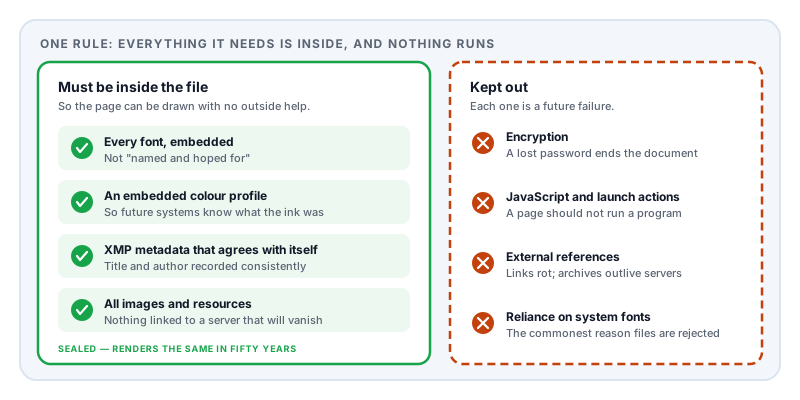
Everything PDF/A requires follows from that. The document must be completely self-contained and its appearance must be fully determined by the file itself. Anything that makes the rendering depend on the outside world is prohibited.
Run down the rules and each one is that principle applied to a specific risk:
All fonts must be embedded. A file that names a font and expects the reader to have it will look wrong on any machine that does not — which is already the most common cause of a PDF changing appearance today, let alone in 2075.
No encryption. A password creates a dependency on information stored somewhere other than the file. Archives will not accept a document that can become permanently unreadable because a credential was lost.
No JavaScript, launch actions, or executable content. Active content is unpredictable, unreproducible, and a security liability. A document should describe a page, not run a program.
No external references. Images, fonts, and content must be inside the file, not linked to something on a server that will not exist.
Device-independent colour. Colour must be defined against an embedded profile, so a future system knows what the ink was supposed to look like rather than guessing.
Structured metadata is mandatory. The file must carry XMP metadata, and it must agree with the document information dictionary — two places that record the title and author, which in ordinary PDFs frequently contradict each other.
The versions, and which one to use
PDF/A has been published in four parts, each tracking a newer base version of PDF.
| Part | Published | Based on | What it added |
|---|---|---|---|
| PDF/A-1 | ISO 19005-1:2005 | PDF 1.4 | The original. Strictest — no transparency, no layers. |
| PDF/A-2 | ISO 19005-2:2011 | PDF 1.7 | Allowed transparency, layers, JPEG 2000; added level U. |
| PDF/A-3 | ISO 19005-3:2012 | PDF 1.7 | As A-2, but permits arbitrary embedded files. |
| PDF/A-4 | ISO 19005-4:2020 | PDF 2.0 | Modernised; replaced the old conformance levels. |
For parts 1 to 3 there are also conformance levels:
- Level B (basic) — guarantees the document will look the same in future. This is the usual requirement.
- Level U — level B plus reliable Unicode mapping, so the text can be extracted and searched. Available from PDF/A-2 onward.
- Level A (accessible) — level U plus full logical structure tagging, so a screen reader can navigate headings, reading order, and tables. Considerably harder to achieve, and it depends on the source document being structured properly in the first place.
If you have not been told which, PDF/A-2b is the conventional safe answer. Where an institution names a version, follow it exactly — their validator will be checking for that specific one, and a PDF/A-1b file submitted where PDF/A-2b was requested may be rejected on a technicality.
PDF/A-4 works differently: it drops the a/b/u scheme, and instead defines PDF/A-4 alongside the variants PDF/A-4f (which permits embedded files) and PDF/A-4e (for engineering documents with 3D models).
The part that archivists argued about
PDF/A-3 is worth a paragraph because it looks like a contradiction. It permits any file whatsoever to be embedded inside the document — a spreadsheet, a CAD drawing, an XML data file.
That sits awkwardly with the self-containment principle, since nothing guarantees a future system can open the embedded spreadsheet. The archival community was not enthusiastic.
It exists because it solves a genuine problem: hybrid documents that are simultaneously human-readable and machine-readable. Electronic invoicing standards used across Europe rely on exactly this — a PDF a person can read with structured invoice data embedded inside it, one file serving both audiences. If you are being asked for PDF/A-3, this is almost certainly why.
Why institutions insist on it
The requesters cluster into a few groups, and their reasons are practical rather than bureaucratic.
Academic journals and thesis repositories need submissions readable indefinitely, and need the text extractable for indexing and plagiarism checking — which is why some ask for level U or A rather than B.
Courts and patent offices need documents whose appearance is evidentially stable. A filing that renders differently later is a problem in a way that an ordinary business document is not.
Government archives and records offices are often under a legal retention obligation measured in decades, and PDF/A is the format most national archives have standardised on.
Tax and regulatory authorities need machine processing to work reliably across millions of submissions from thousands of different producers.
Why files get rejected
Validators check the rules mechanically, and the same handful of failures come up over and over:
Fonts not embedded. The single most common cause. Frequently it is one font the author never consciously chose — a symbol in a formula, a bullet glyph, or a typeface used only in a page header.
The file is encrypted. Sometimes without the author realising, because a template or a corporate policy applied protection automatically.
Transparency in a PDF/A-1 file. A drop shadow or a translucent logo will fail level 1 while being perfectly acceptable in PDF/A-2.
Metadata missing or inconsistent. The XMP block absent, or its title disagreeing with the document information dictionary.
Level A requested, document not tagged. Structure tagging has to come from the source document. It cannot be conjured by a converter after the fact, and a converter that claims to add it usually produces something that fails inspection.
The file claims conformance it does not have. This one deserves emphasis. The PDF/A label is simply an assertion recorded in the metadata. Writing that assertion is trivial; satisfying the rules is not. Plenty of software marks files as PDF/A while producing output that fails validation — so if a submission matters, validate it rather than trusting the label.
How to produce one
Export directly from the application that created the document. This is much more reliable than converting afterwards, because the original application still has the fonts, the colour information, and the document structure. Word, LibreOffice, LaTeX toolchains, and most publishing software all offer PDF/A output.
Converting an existing PDF is a repair job, and it can only work with what is in the file. If a font was never embedded and is not installed on the converting machine, no converter can recover the missing outlines — it will either substitute something else or fail. Converting a scanned document produces a valid PDF/A that contains no text at all, which passes level B and is useless if level U or A was wanted.
Validate before submitting. Independent validation tools exist, including open-source ones used by national archives. Given that the alternative is a rejection notice after a deadline, it is worth the five minutes.
What Lemmafour does and does not do
Markdown to PDF can target PDF/A directly. Setting pdfProfile in the document’s frontmatter selects the standard the output is generated against:
pdfProfile value | What it targets |
|---|---|
tagged | An ordinary tagged PDF 1.7. The default. |
pdf-ua-1 | PDF/UA-1, the accessibility standard. |
pdf-a-2u | PDF/A-2u — archival, with Unicode-mapped text. |
pdf-a-2a-ua-1 | PDF/A-2a together with PDF/UA-1 — archival plus full accessibility tagging. |
Because the document is generated rather than converted, the usual failure modes do not arise: fonts are embedded as a matter of course, nothing is encrypted, and no scripting or external references are ever introduced. There is no missing information for a converter to guess at.
Two honest caveats. The standards-targeted profiles require a Day Pass or Pro — the default tagged output is free. And we do not ship a validator. Targeting a standard and being certified against it are different things, so if a submission carries a deadline, run the output through an independent validator before you send it. That advice applies to every producer, ours included.
If your document already exists as a PDF from somewhere else, this does not help you — Markdown to PDF generates new documents rather than converting existing ones. For that, go back to the application that authored it.
The most common reason anyone reads this page is a repository that has just rejected a submission. If that is you, getting a thesis past the submission checks walks through the whole checklist a university repository applies, of which PDF/A is only one item.
Sources and further reading
- ISO 19005-1:2005, PDF/A-1 — the original archiving standard, based on PDF 1.4.
- ISO 19005-2:2011, PDF/A-2 — adds transparency, layers, and the U conformance level.
- ISO 19005-3:2012, PDF/A-3 — permits arbitrary embedded files, enabling hybrid human- and machine-readable documents.
- ISO 19005-4:2020, PDF/A-4 — the current part, based on PDF 2.0, replacing the a/b/u conformance levels.
- ISO 32000-2:2017, the PDF 2.0 specification — the base format that PDF/A restricts.
- ISO 14289-1, PDF/UA — the accessibility standard closely related to PDF/A level A conformance.
- ISO 16684-1, XMP — the metadata standard PDF/A requires every conforming file to carry.