
Someone asks you to send a document securely, so you add a password to the PDF. Reasonable, and it takes ten seconds.
What almost nobody realises is that the box you clicked may have done one of two entirely different things. One of them genuinely encrypts your document so that its contents are unreadable without the password. The other leaves the document readable by everyone and attaches a note asking software to behave.
They are both called “password protection”, they appear in the same dialog, and the difference between them is enormous.
The two passwords
The user password — often labelled “open password” or “document open password” — is real encryption. When it is set, the text and images inside the file are encrypted. Software that does not have the password cannot display the document, because it cannot decrypt the content. Someone who intercepts the file gets ciphertext.
The owner password — often labelled “permissions password” or “restrict editing” — does something quite different. The document is still encrypted in a technical sense, but the key needed to decrypt it can be derived without knowing any password at all. Any conforming reader opens the file normally.
What the owner password adds is a set of permission flags: a small collection of switches saying whether printing is allowed, whether text may be copied, whether the document may be modified, whether it may be extracted for accessibility.
Here is the essential point. Those flags are instructions to the reader, not enforcement. The specification describes what a conforming reader should do. Nothing in the file makes it happen. A PDF reader that ignores the flags entirely will display, print, and copy the document without difficulty — and it is not breaking encryption to do so, because the content was never withheld from it in the first place.
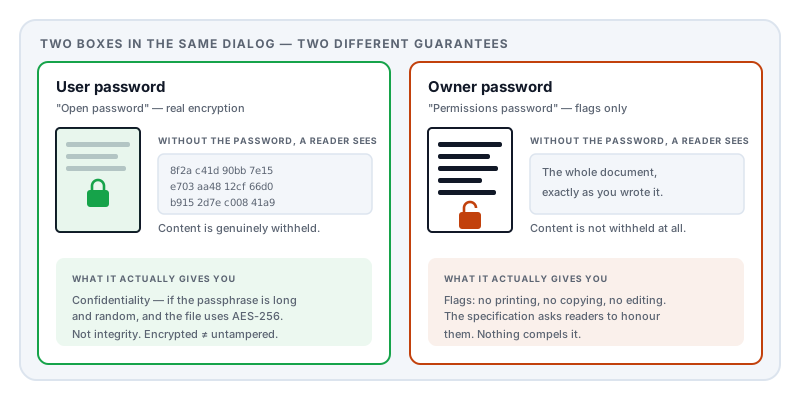
This is why “the PDF is password protected, so the redacted text underneath the black boxes is safe” is a dangerous belief. If the protection is an owner password, the text was never protected at all.
What the research says about the encryption itself
Even the real encryption deserves a careful look, because it has been studied properly and the findings are uncomfortable.
In 2019 a team from Ruhr University Bochum and Münster University of Applied Sciences presented Practical Decryption exFiltration: Breaking PDF Encryption at ACM CCS. They demonstrated two classes of attack on encrypted PDFs.
The first abuses the fact that PDF allows a document to be partially encrypted. An attacker who has an encrypted document — but not the password — can wrap the encrypted portion inside content they control. When the legitimate recipient opens the file and enters their password, the reader decrypts the content and then obediently follows the attacker’s instructions to send the plaintext somewhere.
The second exploits a flaw in the encryption specification itself, allowing an attacker to manipulate encrypted content given only a single block of known plaintext — a condition the format guarantees by design.
They tested 27 widely used PDF viewers and found all of them vulnerable.
The underlying lesson generalises beyond the specific bugs: PDF encryption protects confidentiality, not integrity. It can hide content from someone who lacks the password. It does not reliably prevent someone from modifying the file in ways that survive and matter.
A related 2021 paper at NDSS, Shadow Attacks: Hiding and Replacing Content in Signed PDFs, made the parallel point about digital signatures — a document can be prepared so that what the signer approved and what a reader later sees are different, and 16 of 29 tested viewers were affected. Different feature, same theme: PDF’s security features are more fragile than their names suggest.
The encryption has aged in layers
PDF encryption was not designed once. It accumulated:
| Introduced | Scheme | Standing today |
|---|---|---|
| PDF 1.1 | RC4, 40-bit key | Broken. Recoverable by brute force on ordinary hardware. |
| PDF 1.4 | RC4, up to 128-bit | Deprecated. RC4 itself is no longer considered sound. |
| PDF 1.6 | AES-128 | Acceptable, if the password is strong. |
| PDF 2.0 | AES-256 | The current standard. |
Files created a long time ago, or by old software still in service, may well be using the weakest of these. The dialog box gives no hint — “password protected” reads the same either way.
And whatever the scheme, encryption is only as good as the password. An attacker who has the file can attempt passwords offline, as fast as their hardware allows, with no lockout and nobody watching. A memorable word with a number after it does not survive that. A long random passphrase does.
The metadata exception
One detail worth knowing, because it defeats a reasonable assumption.
PDF includes a flag controlling whether document metadata is encrypted along with the content. It exists so that search indexers and document management systems can catalogue a file they are not permitted to read.
When metadata encryption is switched off, the document’s title, author, producing software, and creation and modification timestamps remain readable without the password. The contents are protected; the fact that this is Q3_Redundancy_List.docx, authored by a named person, on a particular date, is not.
That is often exactly the information you were trying to keep private. It is worth checking what your document’s metadata reveals separately, rather than assuming encryption covered it.
What a password cannot do at all
It is worth being blunt about the limits, because passwords create a false sense of finality.
Once a legitimate recipient has opened your document, they can screenshot it, photograph the screen, retype it, or print it to a new PDF with no protection whatsoever. No document format can prevent this, because the recipient has to be able to read it — that is the point.
Password protection is a control on who can open the file. It is not a control on what happens next, and it never has been.
Practical guidance
Know which password you are setting. If the dialog asks for one password to open and offers a separate optional one for permissions, they are the two described above. If you only want to stop the document being read by the wrong person, the open password is the one that matters.
Never send the password alongside the file. A password in the same email as the attachment protects against nothing. Use a different channel.
Use a long random passphrase, and reckon on offline attack speeds rather than website login limits.
Do not use permissions flags as a security control. As a signal — “please do not redistribute this” — they are fine and mildly useful. As protection against someone who wants the content, they are theatre.
Do not rely on encryption to hide identity. Check the metadata separately.
For genuinely sensitive material, encrypt the transfer rather than the document. An encrypted archive or a properly end-to-end encrypted transfer gives stronger and better-studied guarantees than PDF’s own scheme.
One practical consequence worth knowing about: some readers report an encrypted file they cannot handle as damaged rather than asking for a password, which sends people looking for a repair tool they do not need. If a file from a bank or payroll system refuses to open, start here before assuming it is broken.
A note on what we do not do
Lemmafour does not remove passwords or strip permission flags from PDFs, and this is a deliberate choice rather than a gap. The demand for it comes overwhelmingly from people trying to open documents that are not theirs, and we would rather explain how the mechanism works than build the tool.
What we do is keep your document on your own device while you work on it. That is a different concern from encryption, and in practice often a more immediate one: a password on a file you have just uploaded to a stranger’s server addresses the wrong threat entirely.
Sources and further reading
- Müller, J., Ising, F., Mladenov, V., Mainka, C., Schinzel, S. and Schwenk, J., Practical Decryption exFiltration: Breaking PDF Encryption, ACM CCS 2019 — the study that found all 27 tested PDF viewers vulnerable.
- Mainka, C., Mladenov, V., Rohlmann, S. et al., Shadow Attacks: Hiding and Replacing Content in Signed PDFs, NDSS 2021 — the parallel result for digital signatures.
- ISO 32000-2:2017, the PDF 2.0 specification — defines the standard security handler, the user and owner password roles, the permission bits, AES-256 encryption, and the metadata encryption flag.
- ISO 32000-1:2008 — the earlier edition, which documents the RC4-based schemes still found in older files.
- NIST SP 800-175B Rev. 1 — current guidance on cryptographic algorithm selection, useful context for why RC4 and 40-bit keys are no longer acceptable.