You double-click a PDF and get an error rather than a document. Before assuming the file is lost, it is worth knowing that most of these cases are not damage at all — and the ones that are usually involve one small table.
How a PDF is found
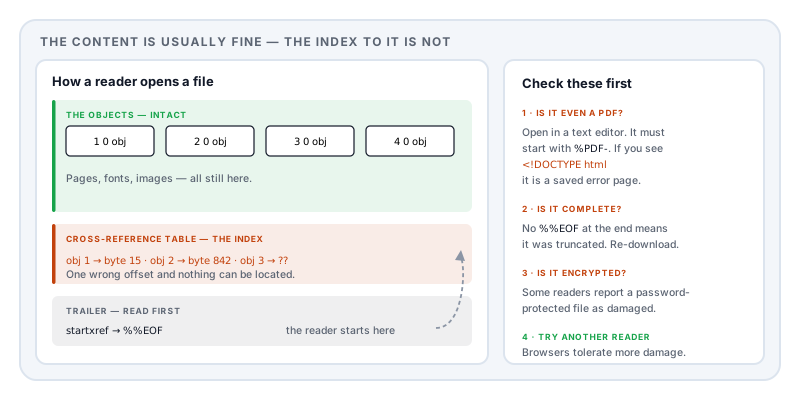
A PDF is not read from the beginning. It is read from the end.
The last thing in the file is a pointer saying where the cross-reference table lives. That table is an index: for every object in the document, the byte offset where it starts. The reader jumps to the end, reads the pointer, loads the index, and from then on can find any page, font or image directly.
It is an efficient design — you can open page 400 of a 500-page document without parsing the first 399 — and it has one consequence. If the last few hundred bytes are wrong, the reader cannot find anything, even though the entire document may be sitting intact in the file.
That is what “damaged” usually means. Not that the content is gone; that the index to it is broken.
Work through these in order
1. Is it actually a PDF?
Open the file in a plain text editor and look at the first line. A real PDF begins with %PDF- followed by a version number. If you see <!DOCTYPE html or <html, you have downloaded a web page — usually a login prompt, an error page, or a “your session expired” screen that was saved with the name of the file you wanted.
This is far more common than genuine corruption, and the giveaway is size: a few kilobytes where you expected several hundred.
2. Is the file complete?
Compare its size to what you expected. Then check the end of the file for the marker %%EOF. Its absence means the file was truncated — an interrupted download, a failed transfer, a full disk.
Truncation is the one case where nothing can be recovered beyond the bytes you have, because the rest never arrived. Re-download it.
3. Is it encrypted rather than damaged?
Some readers report an encrypted file they cannot handle as damaged. If it came from a payroll system, a bank or a government portal, it may simply want a password — often a date of birth or a reference number. See what PDF passwords actually do.
4. Try another reader.
Readers vary enormously in how much malformation they tolerate. A file that one refuses will often open in another. Drag it into a browser window — browser viewers are frequently more forgiving than desktop applications, and it costs ten seconds.
5. Is it an XFA form?
If you get a page telling you to upgrade your reader rather than an error, the file is not damaged. It contains an Adobe-proprietary form layer that most viewers cannot render — covered in why won’t my PDF form let me type.
What “repairing” actually does
When a reader offers to repair a file, it is doing something specific and worth understanding.
Every object in a PDF is introduced by a marker of the form 12 0 obj. If the index is unusable, a reader can scan the whole file for those markers and rebuild the index from what it finds — reconstructing the offsets by observation rather than trusting the table.
This works well when the objects themselves are intact and only the index is wrong, which is the common case. It fails when the objects are damaged, when the file is truncated, or when the structure tying pages together is missing.
The same techniques underpin PDF forensics, where investigators reconstruct documents from raw bytes — carving objects out of a file and rebuilding the relationships between them.
Worth noting: a file that has been saved several times through incremental updates has several indexes chained together. If one link in that chain is broken, a reader may recover an earlier state of the document rather than the latest — which can be confusing, and is occasionally useful.
How files get into this state
Interrupted transfers — a download that stopped, an email attachment truncated by a gateway, a copy from failing storage.
Interrupted saves — an application closed or crashed mid-write. This is precisely what incremental updates were designed to protect against, and it is why the original portion of a file often survives.
Tools that write bad indexes. Some generators, particularly older or unusual ones, produce indexes that are subtly wrong. Tolerant readers cope; strict ones do not.
Storage or transfer corruption — a flipped byte in the wrong place.
Opening it while it is still being written by another program.
What we do and do not do
To be direct: Lemmafour does not ship a PDF repair tool. When you open a file, the engine either loads it or tells you plainly that it could not — including whether the likely cause is damage or a password — rather than presenting a partially loaded document as though it were fine.
That is a deliberate line. A tool that silently recovers some of a document is a liability when the document is a contract or a filing, because you may not notice what is missing.
If a file matters and will not open, the reliable options are in order: try another reader, re-download it, and ask the sender to resend or regenerate it. A regenerated file from the original source beats a repaired one every time.
Preventing it
Verify after transfer — check the file opens before deleting your copy or confirming receipt.
Keep the source. If you generated the PDF, keep whatever produced it. A PDF is an output; treating it as your only copy is the mistake underneath most unrecoverable losses.
Do not edit a file in place over a network share while others may have it open.
Sources and further reading
- ISO 32000-2:2017, the PDF 2.0 specification — the file structure: header, body, cross-reference table, trailer, the
startxrefpointer, and the%%EOFmarker. - CPR: Corrupted PDF recovery algorithm for digital forensic investigations, Forensic Science International: Digital Investigation — object carving and reconstruction of PDF structure from raw bytes.
- ISO 32000-1:2008 — the earlier edition, specifying the same cross-reference and trailer mechanism found in most existing files.