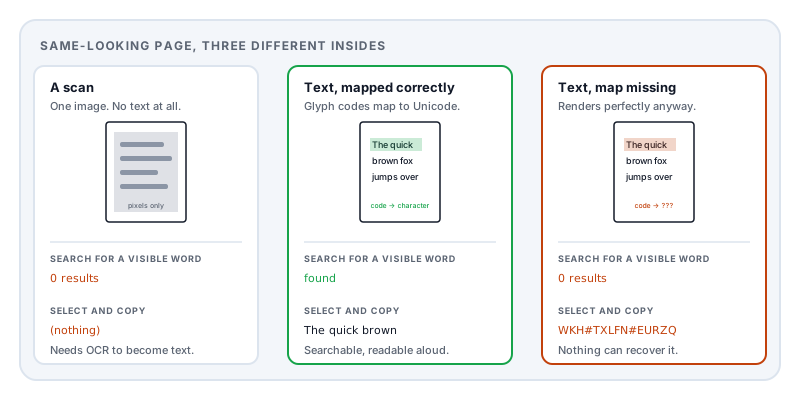
You need one paragraph out of a PDF. You drag your cursor across it and nothing highlights — or worse, something highlights, you paste it, and what lands in your document is WKH#TXLFN#EURZQ instead of the sentence you were looking at.
These are two completely different problems with two completely different explanations, and telling them apart takes one keystroke.
Press Ctrl+F (or Cmd+F) and search for a word you can plainly see on the page.
If the viewer reports no results, there is no text in the file at all. If it finds the word but copying produces nonsense, the text is there and something else is wrong.
Case 1: there is no text, only a picture
A scanned document contains no words. It contains a photograph of words.
When a page goes through a scanner, the output is a grid of pixels. Some of those pixels happen to be arranged in the shape of letters, but the file has no idea that they are letters — it holds exactly the same kind of data as a holiday photo. There is nothing to select for the same reason you cannot select the writing on a road sign in a snapshot.
This is the case for most documents issued by government offices, hospitals, older courts, and anything that has been printed, signed, and scanned back in. It is also the case for a surprising number of documents that were born digital and then passed through a print-and-scan cycle somewhere in their life, losing their text layer permanently at that step.
A scan with OCR is a hybrid. Optical character recognition looks at the image, guesses what the letters are, and adds an invisible text layer positioned on top of the picture. The visible page is still the scan; the selectable text is a transcription floating over it. That is why selecting text on an OCR’d scan often feels slightly wrong — the highlight boxes do not quite line up with the letters, because they are two separate things sitting in roughly the same place. It is also why OCR’d text contains errors that the visible page does not: you are reading the image, but you are copying the guess.
Case 2: the text is there, and it copies as nonsense
This is the more interesting failure, and the one that makes people think their file is corrupt. The page looks flawless. Every letter is crisp. And the clipboard fills with garbage.
To understand it, you need one fact about how PDF stores text: the codes in the file are not necessarily the characters you see.
A PDF does not say “draw the letter H”. It says “draw glyph number 42 from font resource F1”. The number is an index into a font, and it identifies a shape, not a meaning. Which shape sits at which number is entirely up to whoever built the font.
Normally the numbering follows a familiar convention and everything lines up. But most PDFs embed subsetted fonts — cut-down copies containing only the characters the document actually uses, which is what keeps file sizes sane. When a producer subsets a font, it frequently renumbers the glyphs from scratch, often in order of first appearance. The first distinct letter in your document becomes glyph 1, the second becomes glyph 2, and so on. The page still renders perfectly, because the drawing instructions and the font agree with each other.
But now nothing in the file connects glyph 1 back to the letter T.
The PDF format’s answer is a lookup table called a ToUnicode CMap — an explicit map from the codes used in the document to real Unicode characters, included specifically so that software can recover the text. When it is present and correct, copying works. When the producer omits it, writes it incorrectly, or drops it during a conversion step, you get a document that is perfectly readable by humans and unreadable by machines.
This is not rare. It is a well-known weakness of several PDF generation paths, and it is why the same document can be fully searchable in one copy and completely opaque in another that looks identical.
The missing spaces
A related oddity worth knowing, because it makes copied text hard to use even when the character mapping is fine: the gaps between words are often not space characters.
PDF positions text explicitly. Rather than emitting a space character, a producer will typically draw one word, then issue an instruction that moves the drawing position a certain distance to the right, then draw the next word. The visual gap is pure geometry. Many subsetted fonts do not even contain a space glyph, because the document never actually draws one.
When software extracts that text, it has to infer where the words divide by measuring the gaps — deciding that 3.2 points is a word break and 0.4 points is just letter spacing. That inference is usually right and sometimes wrong, which is why pasted PDF text so often arrives with words fused together or split apart at odd places.
Ligatures compound it. Typesetting systems replace f followed by i with a single combined fi glyph for appearance. Without a correct mapping, that one glyph either copies as one strange character or vanishes.
Why this matters beyond copying
The text layer is not just a convenience. Several things you might want to do depend entirely on which case you are in:
| What you want to do | Real text | Scan (no OCR) |
|---|---|---|
| Search the document | Works | Nothing found |
| Copy a quotation | Works | Nothing to copy |
| Edit a word in place | Possible | Not possible — you would be editing pixels |
| Redact by selecting text | Works | Must be done by area, not by selection |
| Screen reader access | Works | Silent — nothing to read aloud |
| File size | Small | Large |
The redaction row deserves emphasis. On a scanned page there is no text to remove, so redaction means destroying image pixels in a region. On a text page, covering the area visually is not enough — the characters remain underneath and are trivially recoverable, which is the whiteout failure that has embarrassed governments and law firms repeatedly.
And an OCR’d scan is the dangerous middle case: it looks like an image, so people redact it like an image — but it carries an invisible text layer that a black rectangle does not touch. If you redact a scan by drawing boxes and the file has a hidden OCR layer, the words underneath are still there and still searchable.
What you can actually do
If it is a scan and you need the text, you need OCR. That is a genuinely hard problem involving trained recognition models, and it is not something Lemmafour does — we would rather say so than pretend. Any tool that offers it needs to be judged on where the processing happens, because OCR is usually done on a server.
If it is a scan and you just need to add information to it, you do not need OCR at all. Add text to PDF places real text anywhere on the page, and the result is genuinely searchable text sitting on top of the image.
If the text is there but copies badly, the practical workaround is to try a different viewer before assuming the file is at fault, since extraction quality varies considerably between implementations. Where the mapping is genuinely absent from the file, no viewer can recover it — the information required simply is not present, and the only reliable route is back to whoever produced the document.
If you need the pages as images anyway, PDF to images exports them directly, which sidesteps the whole question.
Whichever case you are in, knowing which one it is changes what you should try — and saves you from the very common mistake of concluding that a perfectly good document is broken.
Sources and further reading
- ISO 32000-2:2017, the PDF 2.0 specification — defines font encoding, character codes, glyph selection, and the ToUnicode CMap used to recover text from a rendered page.
- ISO 32000-1:2008 — the earlier edition, containing the same text-showing operators and positioning instructions that make inter-word gaps geometric rather than character-based.
- The Unicode Standard — the character model that a ToUnicode CMap maps into, and the source of the ligature and combining-character behaviour described above.
- ISO 14289-1, PDF/UA — the accessibility standard, which requires a correct text layer precisely because screen readers cannot interpret a page image.