You delete three pages from a 4 MB PDF, save it, and the file is now 4.1 MB.
Nothing has gone wrong. Your editor did exactly what the PDF format was designed for. But the reason is worth understanding, because it has a second half that matters considerably more than the file size.
PDFs are usually appended to, not rewritten
When most software saves a change to a PDF, it does not rebuild the document. It leaves every original byte exactly where it is and appends the changes to the end of the file.
The appended block contains the objects you altered — a modified page list, a new annotation, an edited text stream — followed by a small table saying where those new objects live and which older ones they supersede.
To open the file, a reader jumps to the end, reads the most recent table, and follows it. Objects listed there win; anything not mentioned is still read from the original portion. The document you see is the result of the original plus every revision layered over it, resolved newest-first.
This is called an incremental update, and it is specified behaviour, not a bug or a shortcut.
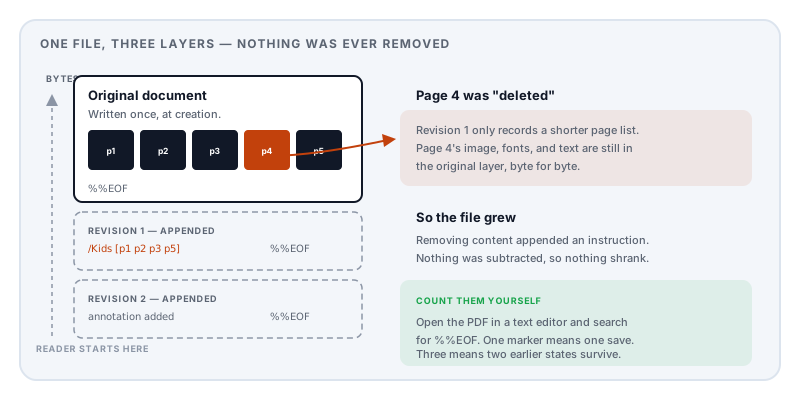
Which explains the arithmetic. Deleting content does not remove bytes; it adds them. You appended a revision saying “the page list no longer includes page 4”. The instruction costs a few hundred bytes. Page 4 — with its scanned image, its fonts, all of it — is still sitting in the original portion of the file, untouched and unreferenced.
Why the format works this way
Three reasons, and the third is the one that made it non-negotiable.
Speed. Appending a few hundred bytes to a 40 MB document is instant. Rewriting the whole thing is not — and on the hardware this format was designed for, the difference was between a responsive application and an unusable one.
Crash safety. If the save is interrupted, the original file is still intact and readable. The incomplete revision at the end is simply ignored. A full rewrite interrupted halfway leaves you with nothing.
Digital signatures. This is the real reason. A signature in a PDF covers a specific range of bytes. Change any of them and the signature breaks — correctly, because that is what a signature is for. So how do you add a second signature to a countersigned contract, or fill in a form field on a certified document, without destroying the first signature?
You append. The original signed bytes are never touched, so the first signature still validates, and the new revision carries its own. Incremental update is what makes multi-party signing possible at all. Remove it and the feature disappears.
So the growth you noticed is the cost of a real capability, not carelessness.
It has one failure mode worth knowing about. A file saved this way carries several indexes chained together, and if a link in that chain breaks, a reader may recover an earlier state of the document instead of the latest — or refuse to open it at all. That is the usual story behind a PDF that will not open.
The part that matters more than the size
If the original bytes are still in the file, then so is everything you thought you removed.
The page you deleted. The paragraph you rewrote. The comment you resolved. The earlier draft of a figure. In many cases, content that sat under a redaction box in a previous revision.
This is not theoretical, and it is not obscure. It is the routine basis of document forensics: examiners recover prior states from PDFs precisely because incremental saves preserve earlier content, which can establish how a document evolved and expose edits its author believed were gone. Recent work in the digital-forensics literature on reconstructing PDFs from raw bytes — carving objects and rebuilding the relationships between them — describes exactly the structures that make this recovery possible.
Security research has taken it further. The 2021 NDSS paper Shadow Attacks: Hiding and Replacing Content in Signed PDFs showed that a document can be prepared with content that is hidden when a party signs it and revealed afterwards, with the signature still validating — because the incremental structure allows a later revision to change what is displayed without altering the signed bytes. The researchers found 16 of 29 tested PDF viewers vulnerable.
The everyday version is more mundane and more likely to affect you. You take a contract, delete the annexe with the pricing from another client, and email it. Visually the annexe is gone. Structurally it may be one text-editor search away.
This belongs to the same family as the redaction failures that have embarrassed governments and law firms repeatedly: content that has been hidden being mistaken for content that has been removed.
How to check your own file
You do not need forensic tools. You need a text editor.
- Open the PDF in a plain text editor. Most of it will be binary noise — that is expected.
- Search for
%%EOF.
%%EOF is the end-of-file marker. A PDF written once contains exactly one, at the very end. Every additional occurrence is an appended revision.
Three markers means the document has been saved over twice since it was created, and two earlier states are still inside it. It will not tell you what is in them, but it tells you they exist — which is usually the question you actually have.
A second, cruder check: if you deleted a page and the file got bigger, that is an incremental update by definition. Nothing else produces that result.
Removing earlier revisions
The only thing that genuinely removes them is rewriting the document from scratch: reading the current state, building a fresh file containing only what is still referenced, and discarding everything else.
Two things have to happen. The file is re-serialised, so there are no appended layers to recover. And unreferenced objects are garbage collected — because simply rebuilding is not enough if the new file still carries objects nothing points at any more.
That second step is subtler than it sounds. Removing a watermark image, for instance, often leaves the image itself still listed in a page’s resource dictionary even though no drawing instruction references it. A naive rebuild keeps it, because it is technically still reachable from the document root. Genuinely reclaiming it means checking which resources the page content actually uses, dropping the ones it does not, and only then collecting what has become unreachable.
The trade-off is unavoidable: a full rewrite invalidates any digital signature on the document, because the signed bytes no longer exist in their original form. That is correct behaviour — you have produced a different file. If a document’s signatures matter, you cannot also strip its history. Choose deliberately.
How Lemmafour’s tools behave
Lemmafour’s page tools write a new document rather than appending a revision. When you delete pages or rearrange them in Organize pages, the output is a freshly serialised file built from what remains — so removed pages are not carried along as unreferenced baggage.
You can verify this in the way that matters: delete pages and check the file size. It should go down. If it goes up, you are looking at an incremental update.
The cleanup pass goes a step beyond a plain rebuild by reclaiming orphaned streams — the content-aware step described above, where resources a page no longer draws are dropped before unreachable objects are collected. This is why removing a watermark actually shrinks the file rather than merely hiding the mark.
Two honest caveats, because this is a topic where overclaiming would be worse than useless.
A rewrite is not a sanitiser. It removes appended history and unreferenced objects. It does not scrub document metadata, which is a separate concern — see what PDF metadata reveals. And it does not remove content that is still legitimately part of the current document, including text hidden underneath a black box, which needs true redaction.
Verify anything that matters. For a document where a prior revision would be genuinely damaging, do the %%EOF check on the output yourself. We would rather you confirmed it than trusted us.
And since all of this runs in your browser, the document you are cleaning up is not uploaded to a server in order to have its history removed — which would be a strange way to solve a confidentiality problem.
Sources and further reading
- ISO 32000-2:2017, the PDF 2.0 specification — defines incremental updates, cross-reference tables, the trailer, the
%%EOFmarker, and the byte-range mechanism that digital signatures depend on. - ISO 32000-1:2008 — the earlier edition, where the same append-and-supersede file structure is specified.
- Mainka, C., Mladenov, V., Rohlmann, S. et al., Shadow Attacks: Hiding and Replacing Content in Signed PDFs, NDSS 2021 — 16 of 29 viewers vulnerable to content substitution that preserves a valid signature.
- CPR: Corrupted PDF recovery algorithm for digital forensic investigations, Forensic Science International: Digital Investigation — byte-level object carving and reconstruction of PDF structure, the techniques underlying recovery of prior document states.
- Müller, J., Ising, F., Mladenov, V. et al., Practical Decryption exFiltration: Breaking PDF Encryption, ACM CCS 2019 — related work on how PDF’s layered structure undermines assumptions about what a document contains.