PDF metadata is the hidden information a PDF carries about itself — who created it, with which software, and when it was last modified — stored separately from the visible pages. It often reveals more about you than the text on the page does.
When you send a PDF to a client, a landlord, or an opposing counsel, you probably focus on the visible pages. You check the spelling, you verify the numbers, and you make sure the layout looks professional. But a PDF is not a flat piece of digital paper. It is a complex database of objects, dictionaries, and data streams.
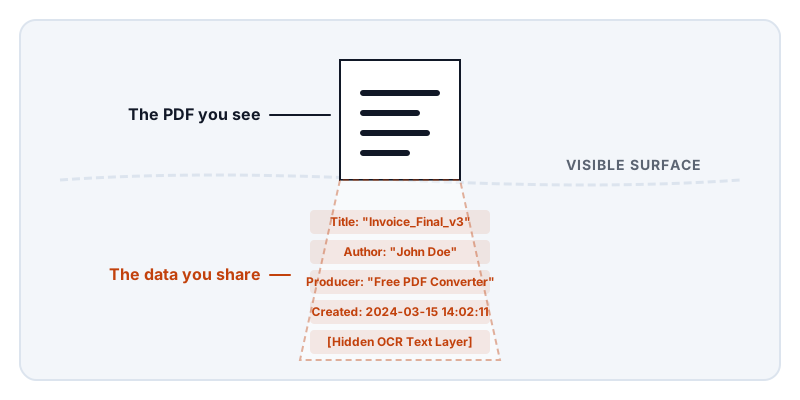
Beneath the visible text and images, your document carries an invisible payload of structural data and history. This hidden information is called metadata, and it often reveals far more about you, your organization, and your workflow than the actual text on the page. Before you share a sensitive document, you need to understand what that file is quietly saying about you.
The two layers of PDF metadata
A PDF stores metadata in two entirely different ways. Understanding this distinction is crucial because some cleaning tools only wipe one layer, leaving the other intact for anyone who knows how to look.
The first layer is the Document Information Dictionary. This is the classic metadata structure built into the original PDF specification in the 1990s. It stores basic key-value pairs at the end of the file. If you open a PDF in a standard reader and view the Document Properties, you are usually looking at this dictionary. It contains fields like Title, Author, Subject, Keywords, Creator (the application that originally created the document, like Microsoft Word), and Producer (the software that converted it into a PDF).
The second layer is XMP (Extensible Metadata Platform). Introduced by Adobe later in the PDF specification, XMP is an XML-based format embedded as a data stream inside the PDF. XMP is far more expansive than the classic dictionary. It can store the exact color profiles used, the editing history, the licensing rights, and the names of the people who reviewed the document in a shared workflow.
Because XMP is XML, it is readable as plain text if you open the PDF file in a code editor. Many modern applications write metadata to both the Document Information Dictionary and the XMP stream to ensure compatibility. If you try to manually wipe the Author field from the classic dictionary using a basic PDF utility, the XMP stream will often still contain your name, waiting to be found by a thorough recipient.
Producer strings and tool history
Every time a PDF is created or modified, the software doing the work leaves its fingerprint in the Producer or Creator fields. This might seem harmless, but it leaks significant context about your workflow and resources.
If you generate an invoice and the Producer string reads “Acme Free Online PDF Editor Trial Version 2.1,” you are telling your client that you use free, ad-supported web tools to handle their financial data. If a law firm submits a supposedly ironclad internal document, but the Producer string reveals it was generated by a consumer-grade mobile scanner app just ten minutes before filing, the opposing counsel immediately knows the document’s true origin and urgency.
The tool history also reveals exactly which PDF engine handled the file. Security researchers and forensic analysts use the Producer string to identify whether a document was forged. If a PDF claims to be a scanned bank statement from 2015, but the metadata shows it was produced by a software version released in 2022, the document is a fabrication.
Timestamps and the timeline of edits
PDFs track time meticulously. A standard file contains a CreationDate and a ModDate (Modification Date). In a multi-editor workflow, the XMP data might contain a dozen timestamps recording exactly when the file was opened, saved, and reviewed by different users.
This timeline is a massive liability in disputes and negotiations. Consider a scenario where you are negotiating a contract and you claim, “We have been reviewing these terms internally for three weeks.” If you send the PDF and the CreationDate shows the file was generated from a Word document twenty minutes ago, your negotiation tactic is instantly exposed.
Timestamps also break the illusion of simultaneous signing. If a document has three signature blocks, and the metadata shows the file was modified and saved by the three parties over a span of four months, the recipient can reconstruct the exact timeline of who agreed to the terms and when. You cannot control what a recipient infers from the dates buried in your file.
Hidden text layers and OCR
Metadata is not the only invisible data in a PDF. One of the most common—and dangerous—forms of hidden data is the optical character recognition (OCR) text layer.
When you scan a paper document, the scanner creates an image of the page. You cannot search or highlight the text in that image because, to the computer, it is just a grid of pixels. To fix this, scanning software uses OCR to “read” the image. It then generates a layer of invisible, selectable text and perfectly aligns it over the image of the words.
This is incredibly useful for finding a specific paragraph in a hundred-page scan. But it becomes a severe privacy risk when you attempt to redact the document. If you draw a black rectangle over a sensitive paragraph in the image, you cover the visual pixels. However, if your tool is a basic image editor rather than a true PDF redactor, it leaves the invisible OCR text layer completely untouched.
The recipient opens the PDF, sees a black box, clicks and drags their mouse over the box, and copies the hidden text right out from under the redaction. This failure happens constantly in legal filings and government releases. To remove the data, you must use a tool that permanently destroys the text objects, not just one that paints a black box over the coordinates.
Form remnants and incremental saves
PDFs are designed to save quickly. If you open a 500-page manual and add a single comment to page 3, rewriting the entire file from scratch would be inefficient. Instead, the PDF specification supports “incremental saves.”
When you use an incremental save, the PDF editor takes your new comment and simply tacks it onto the very end of the file, along with a new index that tells the PDF reader to display the comment. The original 500 pages remain untouched.
This architecture is great for performance, but terrible for privacy. If you open a filled form, delete your Social Security number, and save the file, a basic PDF tool might use an incremental save. The tool appends an instruction saying “do not display the text at these coordinates.” The PDF reader obeys, and the number disappears from the screen. But the original data is still sitting in the middle of the file. Anyone who opens the PDF in a text editor or a low-level diagnostic tool can read the entire history of the document, including the deleted Social Security number.
Incremental saves mean that deleting a page, removing a form field, or deleting a comment does not necessarily erase the data. It merely hides it from the default view.
How to check your own PDF’s metadata
You cannot fix what you cannot see. Before you share a critical document, you should inspect its hidden data.
The simplest check is to open the PDF in your desktop reader (like Adobe Acrobat or Apple Preview) and open the Document Properties or Inspector window. This will show you the basic Document Information Dictionary: Title, Author, Subject, and the Creation/Modification dates. If you see an old author name or a problematic title, you know the file needs cleaning.
However, the properties window only shows you the surface. It will not show you the XMP stream, the incremental save history, or the hidden text layers. To truly inspect a PDF, privacy professionals use command-line tools like ExifTool. Running a PDF through ExifTool extracts every piece of embedded metadata, including the software history and editing timestamps. You can also test for hidden text layers by simply selecting all (Ctrl+A or Cmd+A) on a page and pasting the result into a plain text editor to see what comes with it.
How Lemmafour tools handle hidden data
When you use Lemmafour’s Redact tool to prepare a bank statement or a payslip, the browser engine does not use incremental saves or visual whiteout. The redaction process actively removes the text objects and image regions from the document structure, and the export is written as a fresh file rather than an incremental save, so the deleted data cannot be recovered from the document’s history. The redaction tool also includes sanitize options for stripping document metadata before export.
It is equally important to know when tools do not clean your data. The Compress tool, for example, is designed strictly to reduce file size. It re-encodes images and cleans up unused structural bloat, but it does not actively search for and destroy author names or timestamps. Compression is a structural optimization, not a privacy sanitizer.
Ultimately, your document is your responsibility. Do not assume a PDF is clean just because the pages look right. Use secure redaction tools to remove sensitive text, apply metadata sanitization when the workflow demands it, and always test your final export by inspecting the properties and attempting to select the redacted text. A PDF will tell the recipient exactly how it was made—you have to decide if you are comfortable with the story it tells.