
Yes. A PDF can carry malware, and it has been one of the most heavily used delivery formats for well over a decade.
That answer usually surprises people, because a PDF feels like a picture of a page — something inert, like a photograph. It is not. PDF is a container format with a programming language inside it, and the software that opens it is a large, complicated piece of code parsing input from strangers.
But the honest version of this answer includes the second half: the realistic risk to you personally in 2026 is much lower than it was in 2012, for reasons worth understanding, because they tell you exactly which habits matter.
Two completely different attack mechanisms
People lump these together, and they should not be. They work differently, they are mitigated differently, and only one of them is really still a live threat for ordinary users.
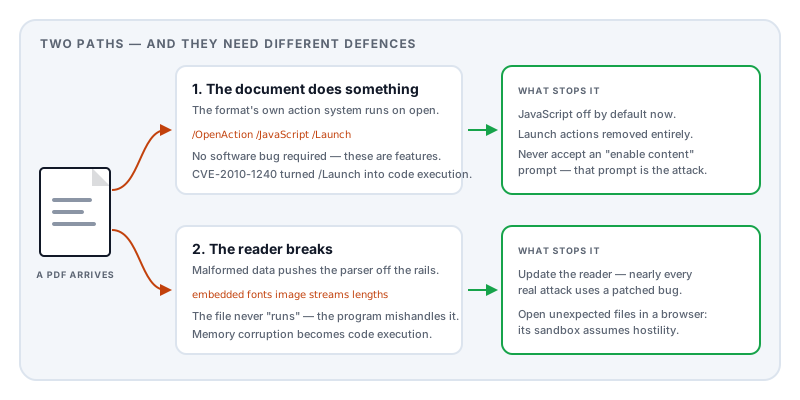
Mechanism one: the document does something.
PDF was designed to do more than display pages. The format includes an action system, and actions can do things well beyond turning to page 12.
A PDF can contain JavaScript. It can specify an OpenAction — something that happens automatically the moment the document is opened, with no click required. It can hold embedded file attachments, which is a perfectly ordinary feature used for invoices and engineering data, and an obvious way to smuggle an executable. And historically it could specify a launch action that started an external program.
That last one produced one of the most instructive vulnerabilities in the format’s history. In 2010 the researcher Didier Stevens demonstrated that the launch action could be used to run arbitrary commands, and that the warning dialog protecting it could be manipulated so that its text was partly attacker-controlled — the dialog asking “are you sure?” could be made to read like a reassurance. It was catalogued as CVE-2010-1240. Crucially, it required no software bug at all in the traditional sense: the format was simply doing what it was designed to do.
Its other lesson was that turning off JavaScript, the standard advice at the time, did not protect you, because this path never used JavaScript.
Mechanism two: the reader breaks.
The second mechanism has nothing to do with PDF features. It targets bugs in the program that reads the file.
Rendering a PDF means parsing compressed data streams, decoding image formats, interpreting embedded font programs, and executing drawing operations — historically in C and C++, for speed. Embedded fonts are the classic soft spot, because a font is itself a small program with its own instruction set, interpreted by the reader.
A malformed document can push that parser into a state its authors never anticipated: writing past the end of a buffer, freeing memory twice, misreading a length field. Done precisely, that becomes code execution. The document is pure data — it never “does” anything — but the program handling it can be induced to.
This is why PDF readers accumulate security advisories year after year, and why “update your PDF reader” is not filler advice.
Why attackers like PDFs so much
Three properties combine unusually well.
They are trusted. People who would never open a stray .exe open PDFs without a thought. A PDF is what a real invoice, a real CV, a real boarding pass looks like.
They are expected. A PDF attachment from a supplier, a recruiter, or a courier raises no suspicion, because that is genuinely how those organisations communicate. The malicious document does not need a pretext — it is the pretext.
They are complex. The specification runs to well over 900 pages. Enormous specifications produce enormous parsers, and enormous parsers have bugs. Complexity is the attacker’s raw material.
There is an active research literature on detecting malicious PDFs precisely because the problem is hard and persistent — and a parallel literature showing that detectors can be evaded by carefully structured files, which is a good reason not to rely on a scanner as your only defence.
Why the risk has genuinely dropped
Several changes have made a real difference, and knowing them tells you what to do.
JavaScript is off or restricted by default in mainstream readers now, rather than on by default as it was in 2009.
Launch actions are dead. Executing external programs from a document was removed or hard-blocked years ago.
Sandboxing. This is the big one. Modern readers parse documents inside a restricted process that cannot reach your files, your network, or your other applications directly. When the parser is compromised, the attacker lands inside a box rather than on your desktop, and needs a second vulnerability to escape it.
Browser viewers changed the default. Most people now open PDFs in a browser rather than a desktop application, and browsers apply the same aggressive sandboxing they use for untrusted websites. One widely used browser implementation goes further and parses PDFs in JavaScript rather than native code, which removes the memory-corruption class of bug almost entirely — you cannot overflow a buffer in a language that has no manual buffers.
This produces genuinely counterintuitive advice: for an unexpected PDF, opening it in your browser is usually safer than opening it in a dedicated desktop reader. The browser is designed on the assumption that everything it touches is hostile. A desktop reader is an ordinary program with your full user permissions.
What actually protects you
Keep the reader updated. Nearly every real-world PDF compromise uses a vulnerability that was already patched. Attackers rely on the gap between a fix shipping and people installing it.
Open unexpected documents in a browser. Drag the file into a browser tab rather than double-clicking it.
Treat “enable” prompts as the alarm. Legitimate documents do not need you to enable content, allow a connection, or permit a script to display an invoice. That prompt is the attack, nearly every time.
Be sceptical of embedded attachments. A PDF containing another file inside it is legitimate but uncommon. In an unsolicited document it deserves suspicion.
Do not rely on the extension. invoice.pdf.exe is not a PDF, and Windows hides the final extension by default. Check the icon and the actual file type.
Remember preview panes count as opening. Your mail client’s preview and your file manager’s thumbnail generator both parse the document. “I did not open it” is not always true.
Where local processing fits — and where it does not
It would be easy to overclaim here, so to be precise: Lemmafour does not scan for malware, and processing a document locally does not make a malicious document safe. If a file is built to exploit a PDF parser, it is dangerous wherever it is parsed.
What local processing does change is narrower and still worth stating. When you use a browser-based tool, the parsing happens inside the browser’s sandbox — the same restricted environment described above — rather than in a native desktop application holding your full permissions. And your document is not transmitted anywhere, so it is not sitting in a third party’s storage waiting on their retention policy.
There is a symmetry worth noticing, too. An upload-based PDF service parses untrusted documents from thousands of strangers on its own servers, which makes those servers a high-value target holding a large pile of other people’s documents. That risk is not yours directly, but the pile your file joins is real.
The honest summary: a browser sandbox is a meaningfully better place to parse an untrusted document than a desktop application, and not uploading it means one fewer copy in one fewer place. Neither is antivirus, and neither is a substitute for an updated reader and ordinary suspicion of unexpected attachments.
One behaviour worth separating from malware entirely: a PDF that quietly fetches something from the network when you open it is not infecting anything, but it can tell the sender you opened it. That is a privacy question rather than a security one, and it works quite differently — can a PDF track when you open it covers what is and is not possible.
Sources and further reading
- NVD entry for CVE-2010-1240 — the launch-action vulnerability described above, in the US National Vulnerability Database.
- ISO 32000-2:2017, the PDF 2.0 specification — defines the action system, document-level JavaScript, open actions, and embedded file streams.
- Laskov, P. and Šrndić, N., Static detection of malicious JavaScript-bearing PDF documents, ACSAC 2011 — a foundational study of JavaScript-carrying malicious PDFs.
- Šrndić, N. and Laskov, P., Detection of Malicious PDF Files Based on Hierarchical Document Structure, NDSS 2013 — analysis of malicious documents by structure rather than content.
- Australian Defence Science and Technology Organisation, Threat Modelling Adobe PDF (DSTO-TR-2730) — a government technical report enumerating the format’s attack surface.