Yes, in specific and limited ways — and knowing exactly which ways is more useful than either reassurance or alarm.
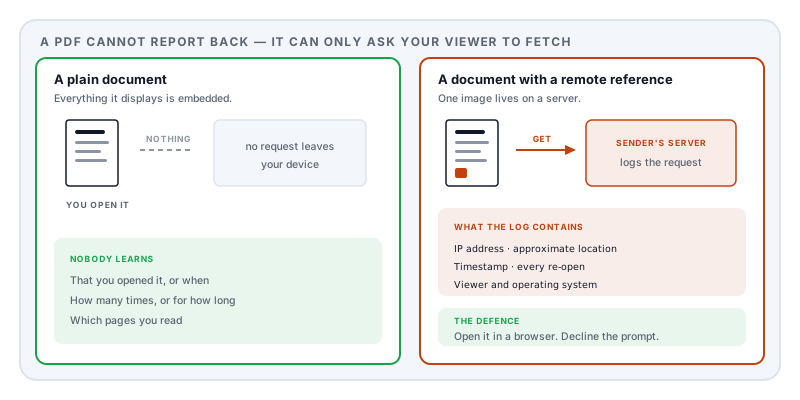
The short version: a PDF cannot report back on its own. It can only ask your viewer to fetch something, and the fetch is what reports. Everything below is a variation on that.
The mechanisms
Remote images and external references. A PDF does not have to embed everything it displays. It can reference a resource by URL, and when the viewer renders the page it requests that resource. The server on the other end logs the request: your IP address, the time, and your viewer’s identity.
That is the PDF equivalent of an email tracking pixel, and it is the main mechanism. The image can be a single transparent dot in a corner, or a legitimate-looking logo. Either way, opening the document is the event that triggers it.
Actions that open a URL. The format’s action system can attach a URI action to the document itself, so that something happens on open rather than on click. Combined with a unique URL per recipient, that identifies exactly who opened it.
Form submission. An interactive form can be configured to submit its contents to a URL. Legitimate for a real form; a channel for anything else.
JavaScript. Document-level scripting can make network requests where the reader permits it. Largely restricted now, and off by default in mainstream readers.
Unique links in the body. Not a technical mechanism at all — a distinct link per recipient means any click identifies the reader. Link shorteners do the same thing by default.
Rights-managed documents. Enterprise information-rights systems phone home by design: the document will not open until a licence server authorises it, and that server logs every attempt. This is disclosed rather than covert, and it is the one case where tracking is the intended feature.
What modern viewers do about it
The defences have improved, and they are the reason this is a manageable problem rather than a serious one.
Browsers. Opening a PDF in a browser puts it inside the same sandbox the browser applies to untrusted websites, and browser PDF viewers are conservative about fetching external resources from documents.
Desktop readers. Mainstream readers have a trust setting governing whether documents may reach the internet. The usual default is to block and prompt, showing you the host being contacted and asking whether to allow it.
That prompt is the decision point. A document that needs to contact a server in order to display a page is doing something unusual. Declining costs you nothing on a legitimate document, because a legitimate document embeds what it needs.
What genuinely cannot be tracked
This is worth stating clearly, because the anxiety often outruns the reality.
A PDF with no external references, no actions and no scripting — which is the overwhelming majority of documents — makes no network request when you open it. Nobody learns that you opened it, when, how many times, how long you spent, or which pages you read. Reading it is a local event, like reading a book.
Nor can a PDF read your files, see your other documents, or identify you beyond what the network request itself reveals.
And a document you have already downloaded, opened with network access denied, will behave identically forever.
How to check a specific document
Open it in a browser with the network inspector open. Load the file and watch the requests. A document that fetches something will show it. This is the same check as the one for where online PDF tools send your files, and it works for the same reason: you can see the traffic.
Watch for the prompt. If a desktop reader asks whether to allow a connection, that is the answer to your question. Note the host it names.
Look at the file as text. Opening a PDF in a plain text editor and searching for http will often surface external references, URI actions and submission targets, even in a compressed file. Absence is not proof, but presence is informative.
What to do
Open unfamiliar documents in a browser. The sandbox is stronger and the defaults are more conservative — the same advice as for PDF malware, for the same reason.
Turn off unrestricted internet access in your desktop reader, so you get the prompt rather than the silent fetch.
Decline the prompt unless you know why the document needs a connection.
Assume the email is tracking even when the PDF is not. Remote images in message bodies are vastly more common than remote references in attachments. Blocking remote content in your mail client addresses more of the real risk than anything you do to the PDF.
If you are the sender: embedding everything is both more reliable and more considerate. A document that renders identically offline is a better document.
A note on the other direction
Tracking is about what a document reveals when it is read. There is a matching question about what it reveals when it is sent — the author name, the producing software, the timestamps and the revision history it carries with it. That is what PDF metadata reveals, and for most people it leaks considerably more than any tracking pixel.
Sources and further reading
- ISO 32000-2:2017, the PDF 2.0 specification — the action system including URI and submit-form actions, document open actions, external streams, and document-level JavaScript.
- NVD entry for CVE-2010-1240 — the launch-action vulnerability that prompted much of the current restriction on documents reaching outside themselves.
- Australian Defence Science and Technology Organisation, Threat Modelling Adobe PDF — an enumeration of the format’s outbound capabilities.
- ISO 19005-2, PDF/A-2 — the archival standard, which prohibits external references precisely because a document should not depend on a server.