Thesis submission is a deadline with a rulebook attached, and the rulebook is usually written for the repository administrator rather than for you. It asks for PDF/A-2b, all fonts embedded, no security settings, under 50 MB, with a particular file-naming convention — and offers no explanation of what any of it means or how to produce it.
The good news is that the list is short, the rules are mechanical, and each one exists for a reason you can act on once you know it.
Why a repository asks for any of this
In January 1995 the computer scientist Jeff Rothenberg published an essay in Scientific American titled “Ensuring the Longevity of Digital Documents”. Its central observation has aged extremely well: digital information faces not one preservation problem but three. The medium degrades. The hardware to read the medium disappears. And — the one that bites hardest — the software needed to interpret the format stops existing.
A thesis is a document with an unusually long expected life. Your university has undertaken to keep it readable and citable essentially indefinitely, long after the software that produced it is gone and everyone involved has moved on.
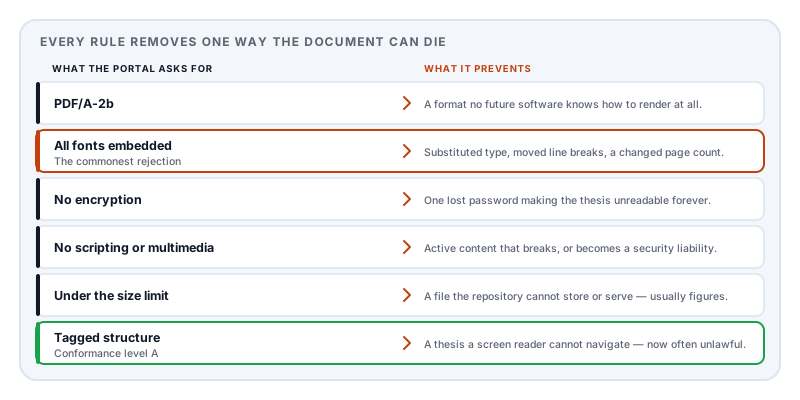
That is the entire justification for the requirements list. Each rule removes one way a document can become unreadable later. Once you see them that way they stop being arbitrary:
The requirements, decoded
“Must be PDF/A.” PDF/A is not a separate format — it is ordinary PDF with restrictions, and a conforming file opens normally in any reader. The restrictions all enforce self-containment: everything the document needs to render must be inside it. If you have been given a version number, follow it exactly, because the validator checks for that one specifically. If you have not, PDF/A-2b is the conventional answer. There is a fuller account in what is PDF/A.
“All fonts must be embedded.” This is the single most common cause of rejection, and it is almost never the body typeface. It is one font nobody chose consciously: a mathematical symbol pulled in by an equation editor, a bullet glyph, a typeface used in a page header, or something inherited from a figure exported by another program. A document with 99% of its fonts embedded fails exactly as hard as one with none.
It is also the rule with the most visible everyday consequence. An unembedded font is substituted on any machine that lacks it, which changes character widths, moves every line break, and can push your carefully-managed page count over the limit on the examiner’s screen.
“No encryption or security settings.” A password creates a dependency on information stored outside the file. An archive cannot accept a document that becomes permanently unreadable if a credential is lost. This catches people out when a template or an institutional policy applied protection automatically and they never knew.
“No embedded multimedia or scripting.” Active content cannot be relied upon to behave the same way — or at all — in future software, and it is a security liability in a public repository.
A page or file size limit. Usually generous, and usually breached by one chapter full of high-resolution figures. This is a compression problem rather than a writing problem.
Accessibility requirements. Increasingly common and, in many jurisdictions, now a legal obligation for publicly funded institutions. This is where PDF/A’s conformance levels start to matter, and where a lot of confusion lives:
| Level | What it adds | Practical meaning |
|---|---|---|
| B (basic) | Visual reproducibility | The document will look right in future |
| U | Reliable Unicode text | It can also be searched and quoted |
| A (accessible) | Full structure tagging | A screen reader can navigate it properly |
Level A is materially harder, because tagging has to come from a properly structured source document. A converter cannot invent a heading hierarchy that was never expressed — if your headings were made by manually enlarging and bolding text, there is nothing for it to work with.
Check before you submit, not after
Three checks, none of which take more than a minute, that between them catch most rejections.
Fonts. Open the document properties in any desktop reader and look at the fonts list. Every entry should say it is embedded — usually shown as Embedded or Embedded Subset. Any entry without that note is a rejection waiting to happen. Read the whole list, including the fonts you do not recognise; those are the ones that fail.
Text. Select all, copy, and paste into a plain text editor. If your prose comes through as readable text, the document has a working text layer. If it comes through as gibberish, or as nothing, the file will fail any level U or A check and will not be findable in a full-text search — which for a thesis is a real loss, not a technicality.
Encryption. The same properties dialog shows a security section. It should say no security or none.
If a validator is available to you, run it. Independent validation tools exist, including open-source ones used by national archives, and five minutes beforehand is cheaper than a rejection notice after the deadline.
If you can choose your own toolchain
Much of the time you cannot — many departments mandate a Word template, and if yours does, everything above still applies and this section does not. But if you are free to choose, writing in Markdown and generating the PDF has some real advantages for exactly this kind of document.
Markdown to PDF generates the document rather than converting one, which removes most conformance failures at the source. Fonts are embedded as a matter of course. Nothing is encrypted. No scripting or external references are ever introduced. There is no missing information for a converter to guess at, because nothing was lost on the way in.
Setting the target standard is one frontmatter line:
pdfProfile: pdf-a-2uThe available values are tagged (an ordinary tagged PDF, the free default), pdf-ua-1 for the accessibility standard, pdf-a-2u for archival with Unicode-mapped text, and pdf-a-2a-ua-1 for archival plus full accessibility tagging. The standards-targeted profiles require a Day Pass or Pro; the default does not.
The scaffolding a thesis needs is also frontmatter:
---
title: Sediment Transport in Braided River Systems
author: Sofia Lindqvist
date: 2026-09-30
template: report
abstract: State the question, method, principal result, and implication.
toc: true
tocDepth: 3
listOfFigures: true
listOfTables: true
headingNumbers: true
equationNumbers: true
bibliography: references.bib
citationStyle: apa
language: en
pdfProfile: pdf-a-2u
---
That gives you a title page, a contents list three levels deep, lists of figures and tables, automatic 1 / 1.1 / 1.1.1 heading numbers, numbered equations, and a bibliography — all regenerated on every export, so they cannot fall out of step with the document the way a hand-maintained contents page does.
Citations use bracketed keys resolved against your bibliography file:
Established work on this mechanism [@rothenberg1995] suggests otherwise.Equations carry a label for cross-referencing and an accessible spoken form:
:::equation{#eq:model alt="y equals beta zero plus beta one x plus epsilon"}
\[
y = \beta_0 + \beta_1 x + \varepsilon
\]
:::
Refer to it later as @eq:model and the number resolves automatically — so inserting an equation in chapter 2 does not silently break every reference in chapters 3 through 7. The same works for @fig: and @tbl: labels.
That alt attribute is what a screen reader speaks, and it is required if you are targeting an accessible profile. It is worth writing as you go; retrofitting spoken forms to two hundred equations the week before submission is nobody’s idea of a good time.
Figures and tables take captions and labels the lists are built from:
:::figure{#fig:grain-size caption="Grain size distribution across the study reach" alt="Histogram of grain size by channel position"}

:::Vector figures — SVG or PDF from your plotting library — stay sharp at any zoom and are usually far smaller than a high-resolution raster export. This matters more than it sounds: figures are almost always what pushes a thesis over a file size limit.
The Research paper recipe in the professional academic pack sets all of this up as a working document with an abstract, method, equation, figure, discussion, references, and appendix already in place. It requires a Day Pass or Pro; the free report template supports the same content when you build those sections manually.
The last week
Combining chapters. If you have written chapter by chapter, Merge PDF assembles them in order. Check the page numbering runs continuously afterwards — separately generated chapters each start at page 1 unless you have set otherwise.
The size limit. If your submission portal rejects the file, that is a compression problem with a known cause: figures. Compress PDF handles it, and getting a PDF under an upload size limit explains which lever to pull first. Do not simply downsample everything — a thesis figure that becomes illegible is worse than a large file, and examiners have failed submissions over unreadable plots.
Then re-run the three checks, because merging and compressing both produce a new file, and a new file has not been checked.
Two honest caveats. We do not ship a PDF/A validator — targeting a standard and being certified against it are different things, so validate independently if the deadline matters. And if your thesis already exists as a PDF from another application, generating is not conversion; go back to the program that authored it and re-export with the right settings.
A note on where the file lives
A thesis is unpublished original research, often under embargo, sometimes containing commercially sensitive or ethically restricted material, and frequently naming human participants in its appendices.
The habit of dragging it into a free online converter to fix a formatting problem deserves more scepticism than it usually gets. Lemmafour’s engine runs in your browser: the document is typeset on your machine and written to your disk, and is not uploaded to a processing server. For a document under embargo, that distinction is not a nicety.
If you are on the other side of this — supervising students rather than submitting — the same generated-document approach solves a different problem, and a teacher’s guide to building assignments with AI and Markdown covers producing a worksheet and its answer key from one source file.
Sources and further reading
- Rothenberg, J., Ensuring the Longevity of Digital Documents, Scientific American 272(1), January 1995 — the essay that framed media degradation, hardware obsolescence, and format obsolescence as the three threats to digital records.
- Rothenberg, J., Avoiding Technological Quicksand: Finding a Viable Technical Foundation for Digital Preservation, Council on Library and Information Resources, 1999 — the extended treatment of the same argument.
- ISO 19005-2:2011, PDF/A-2 — the archiving standard most repositories ask for, including the B, U, and A conformance levels.
- ISO 19005-4:2020, PDF/A-4 — the current part, based on PDF 2.0.
- ISO 14289-1, PDF/UA — the accessibility standard behind level A conformance and the structure tagging it requires.
- ISO 32000-2:2017, the PDF 2.0 specification — the base format, including font embedding and the tagged-PDF structure tree.