Every teacher who has tried this knows the frustration. You ask Gemini, Claude, or Qwen for a worksheet on quadratic equations. It produces something genuinely good — well-sequenced questions, a sensible mark distribution, worked solutions. You copy it into Word, and it arrives as a mess: the equations become plain text, the tables collapse, the heading levels vanish, and you spend forty minutes reformatting what took the model four seconds to write.
The problem is the transfer, not the model. Language models write Markdown natively — it is the format they were trained to produce and the format they emit even when you do not ask. Pasting Markdown into a word processor throws that structure away and makes you rebuild it by hand.
Markdown to PDF takes the Markdown directly and typesets it. The structure the model produced is the structure you get.
The feature that changes how you work: one source, two papers
Start here, because it is the thing that saves the most time and nothing else on this page comes close.
Normally an assignment means maintaining two documents — the student paper and the answer key. You fix a typo in question 4, and now the key is wrong. You reorder two questions, and the key is out of sequence. Anyone who has taught for a year has handed out a key that did not match the paper.
Lemmafour builds both from one file. In the frontmatter you declare which variants exist:
---
title: Algebra Assignment 3
variants: [student, answer-key]
variant: student
---
Then wrap anything that belongs only in the key:
## Question 1 — Quadratic equations (5 marks)

Solve the equation and explain the method you chose.

:::variant{include="answer-key"}
:::callout{kind=important}
**Solution:** Factor to obtain $(x-2)(x-3)=0$, so $x=2$ or $x=3$.
:::
:::
Change variant: student to variant: answer-key, export again, and you have the marking copy. The questions are guaranteed identical because they are literally the same text. The two documents cannot drift apart, because there is only one document.
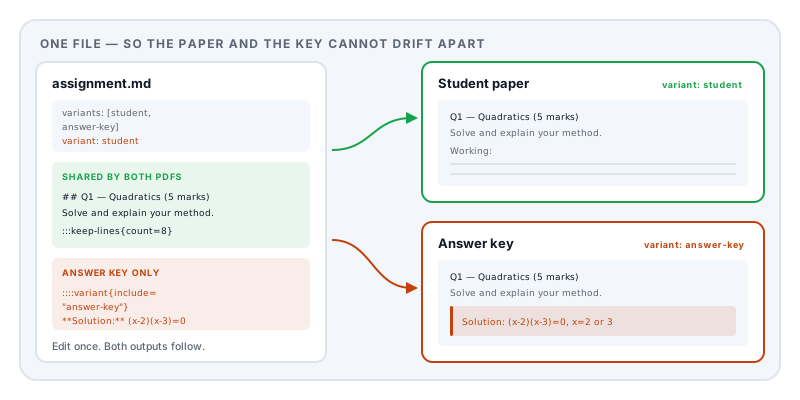
The same mechanism handles other splits: a large-print version, a version with extension questions for a faster group, a translated variant. Any label you put in variants works.
The frontmatter is your control panel
Everything between the opening and closing --- at the top of the file configures the document. You do not need most of it, but knowing what exists saves you fighting the layout later.
| Key | Values | What it does |
|---|---|---|
title, subtitle, author, date | text | Document identity; used on the title page |
template | assignment, lecture-notes, report, article, manual, minimal, and others | Sets margins, numbering, and column defaults as a group |
paper | a4, us-letter | Page size |
margins | compact, normal, wide | Overrides the template’s margins |
columns | 1, 2, 3 | Whole-document column count |
titlePage | true, false | A separate cover page |
toc, tocDepth | boolean, number | Table of contents and how deep it goes |
headingNumbers | true, false | Automatic 1, 1.1, 1.1.1 numbering |
equationNumbers | true, false | Numbers display equations for reference |
codeLineNumbers | true, false | Line numbers on code blocks |
pageNumbering | 1, i, I, a, A | Numeral style |
header, footer | text | Running header and footer |
variants, variant | list, text | The two-paper mechanism above |
pdfProfile | tagged, pdf-ua-1, pdf-a-2u, pdf-a-2a-ua-1 | Output standard — see accessibility below |
For a worksheet, template: assignment is the right starting point. It uses generous 20mm margins, a single column, and no automatic numbering — because you want Question 3, not Section 2.4.1.
For handouts and lesson notes, template: lecture-notes turns on equation numbering, which is what you want when you need to say “substitute into equation (4)”.
The assignment template is included in the free core set. Lecture notes and the education recipe pack are professional choices that require a Day Pass or Pro; the underlying math, diagrams, tables, and manual assignment workflow remain available in the free templates.
Building questions that survive the page break
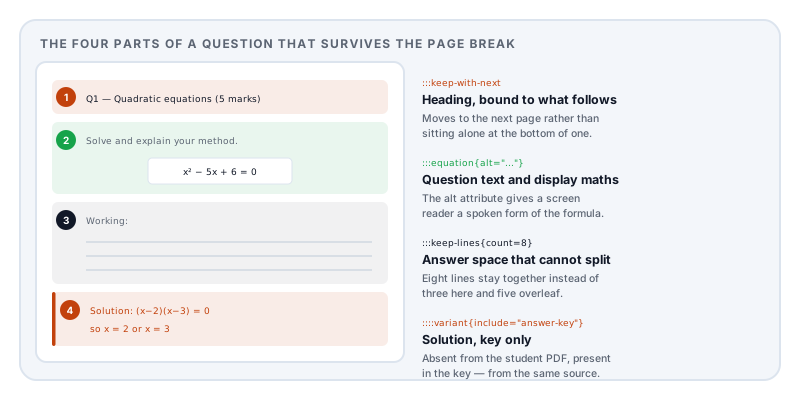
This is where a typesetting engine earns its keep over a word processor, and it is worth understanding because it fixes the two things that make hand-built worksheets look amateur.
A question heading stranded at the bottom of a page. :::keep-with-next binds a block to whatever follows it, so the heading moves to the next page rather than sitting alone.
:::keep-with-next
## Question 4 — Simultaneous equations (6 marks)
:::

Solve the following pair of equations by substitution.
Answer space that splits in half. :::keep-lines{count=8} reserves a block of a given height that is not allowed to break, so eight lines of working space stay together instead of putting three lines on one page and five on the next.
:::keep-lines{count=8}
**Working:**

____________________________________________________________

____________________________________________________________
:::
There is also plain :::keep for any block — a diagram with its caption, a table that must not be split, a code listing.
Multiple choice uses ordinary task-list syntax, which doubles as the answer key when combined with a variant block:
Which expression is equivalent to $2(x+3)$?

- [ ] $2x+3$
- [x] $2x+6$
- [ ] $x+6$
- [ ] $2x+9$
Mathematics
Maths is where copying from a chat window fails hardest, and where this workflow pays off most.
Inline, inside a sentence, wrap in single dollars: The roots of $ax^2+bx+c=0$ are given by...
Display, set on its own line and centred:
:::equation{#eq:quadratic}
\[
x = \frac{-b \pm \sqrt{b^2 - 4ac}}{2a}
\]
:::
The {#eq:quadratic} label lets you refer to it later as @eq:quadratic and have the number resolve automatically — so inserting a new equation earlier in the paper does not silently break every reference after it.
Add numbered=false when you want a displayed equation without a number, which is usually what you want for the equation in a question, as opposed to one you refer back to.
Language models are already fluent in LaTeX maths notation, so this is the part you almost never have to write yourself. Ask for the questions and the notation comes with them.
Accessible maths. An equation is invisible to a screen reader unless someone supplies a spoken form. You can attach one directly:
$2x+6${alt="two x plus six"}and on display equations via the alt attribute:
:::equation{#eq:q1 alt="x squared minus five x plus six equals zero" numbered=false}If your school has an accessibility obligation, this is the single most useful thing on this page.
Tables — rubrics, vocabulary, data
Ordinary Markdown tables work. Wrapping them in :::table adds a caption and a reference label:
:::table{#tbl:rubric caption="Short response rubric" layout=auto}
| Criterion | Full credit | Partial credit |
| --- | --- | --- |
| Method | Valid method shown | Method started |
| Accuracy | Correct result | Minor arithmetic error |
| Communication | Steps and notation are clear | Reasoning is incomplete |
:::
Column alignment comes from the separator row — :--- left, :---: centre, ---: right. Right-align anything numeric and marks columns line up properly.
layout=auto lets columns size to their contents, which is what you want for a rubric where one column holds a sentence and another holds a single word.
Callouts
Five kinds, each styled distinctly: note, tip, important, warning, caution.
:::callout{kind=tip}
**Worked example:** Substitute the known value first, then rearrange.
:::
In practice: tip for worked examples, important for solutions in the answer key, warning for a common mistake, note for context that is not examinable.
Figures, images, and reusable assets
:::figure{#fig:graph caption="Coordinate grid for question 5" alt="A blank coordinate grid" width=100 placement=none}

:::width is a percentage of the text column. placement=none pins the figure exactly where you wrote it rather than letting the engine float it to a better spot — which for a worksheet is what you want, because question 5’s grid must be under question 5.
The alt text is what a screen reader announces, and it is required when you target an accessible profile.
Assets can be SVG, which matters for teaching material: a coordinate grid, a number line, or a blank staff drawn as SVG stays perfectly crisp at any size and adds almost nothing to the file. The built-in assignment recipe ships with graph paper on exactly this basis.
Diagrams from a text description
For science, computing, and anything with a process, Mermaid diagrams are written as text and rendered as vector graphics:
```mermaid
flowchart TD
    A[Observation] --> B[Hypothesis]
    B --> C[Experiment]
    C --> D{Supports hypothesis?}
    D -->|Yes| E[Publish]
    D -->|No| B
```
This is another place where a language model does the work — ask for “a Mermaid flowchart of the water cycle” and paste the result. Because the diagram is text, you can edit a label without redrawing anything, and it stays sharp when printed.
Code, for computing teachers
Fenced code blocks with a language name get proper syntax highlighting, and :::listing adds a caption and a label:
:::listing{#lst:loop caption="Counting to ten"}
```python
for i in range(1, 11):
    print(i)
```
:::
Set codeLineNumbers: true in the frontmatter when you need to say “look at line 7”. Long lines wrap by default rather than running off the page.
Layout control
::pagebreak[]— start a new page. Use it between sections, or before the answer key.:::columns{count=2 gutter=12}— a two-column region, useful for vocabulary lists and short-answer questions that waste half a line each.::columnbreak[]— force the next content into the following column.:::landscape— rotate a region to landscape for a wide data table.:::wide— let one element span the full width inside a multi-column layout.
Accessibility, properly
Many schools and districts now have a legal obligation to provide accessible materials. pdfProfile targets the document at a standard when it is generated, rather than trying to retrofit one afterwards:
| Value | What it produces |
|---|---|
tagged | A tagged PDF 1.7. The default, and free. |
pdf-ua-1 | PDF/UA-1, the accessibility standard |
pdf-a-2u | PDF/A-2u — archival with Unicode-mapped text |
pdf-a-2a-ua-1 | PDF/A-2a with PDF/UA-1 — archival plus full accessibility |
With an accessible profile set, the editor prompts you when a figure has no alt text or an equation has no spoken form, so you find out while writing rather than when a validator rejects the file. The standards-targeted profiles need a Day Pass or Pro; the default tagged output does not.
If you want the background on what these standards are and why an institution asks for them, see what is PDF/A.
A prompt worth saving
The workflow gets much better when the model knows what it is writing for. Paste this at the top of your request to Gemini, Claude, or Qwen:
Write the following as a Markdown assignment for the Lemmafour Markdown-to-PDF engine.
Use YAML frontmatter with: title, author, date,
template: assignment,variants: [student, answer-key], andvariant: student.For each question: wrap the heading in
:::keep-with-next, put the marks in the heading like “Question 3 — Factorising (4 marks)”, and follow it with:::keep-lines{count=6}containing a “Working:” label and blank underscore rules for the answer space.Put every solution inside
::::variant{include="answer-key"}containing a:::callout{kind=important}block starting with “Solution:”.Use
$...$for inline maths and:::equation{#eq:name numbered=false}with\[ ... \]for display maths. Use multiple-choice questions as- [ ]/- [x]task lists. Finish with a rubric as a:::table{#tbl:rubric caption="..." layout=auto}.Output only the Markdown, in a single code block, with no commentary.
The assignment topic is: [your topic, year group, and number of questions]
The last line is the only part you change. Everything above it teaches the model the house style once, and it will hold that format across a whole term of worksheets.
Why it matters that this runs in your browser
Assignments are not neutral documents. An exam paper before the exam is genuinely confidential — a copy on someone else’s server is a real risk, not a theoretical one. Answer keys are worse. And the moment a worksheet is differentiated for a particular student, or a marking note references a support plan, you are handling information about a child that should not be sitting in a third party’s storage under a retention policy you have never read.
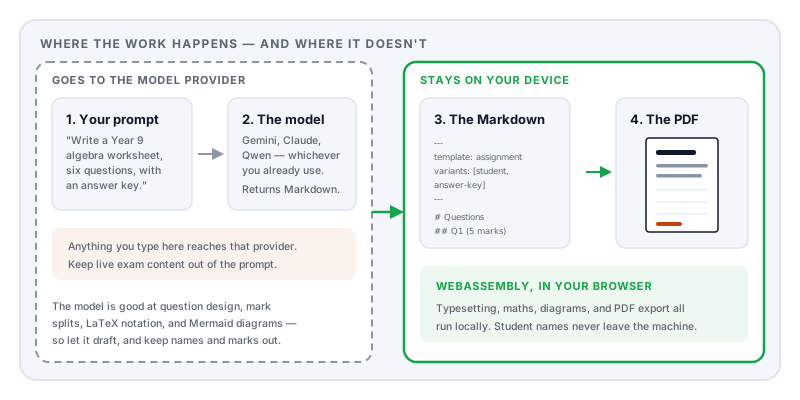
The Lemmafour engine is WebAssembly running inside your browser. You pick a file or type into the editor, the document is typeset on your own machine, and the PDF is written to your disk. Nothing is uploaded, which you can verify yourself in your browser’s network inspector.
One honest boundary, because it is the half we do not control. The model step is not local. Whatever you type into Gemini, Claude, or Qwen goes to that provider, under their terms and their retention policy. So the sensible division of labour is: let the model draft the structure — question design, mark splits, LaTeX notation, a Mermaid diagram — and keep the things that actually need protecting out of the prompt. Student names, marks, support-plan details, and live exam content belong in the editor on your machine, not in a chat window.
Used that way, the confidential half of the work never leaves your device at all. For teachers this is not an abstraction. It is the difference between “I can use this for next week’s test” and “I had better not”.
Putting it together
A complete, working assignment source — copy this and change the content:
---
title: Algebra Assignment 3
author: Ms Delgado
date: 2026-09-14
template: assignment
variants: [student, answer-key]
variant: student
pdfProfile: pdf-ua-1
---

# Instructions

- Show each step clearly.
- Include units and labels where needed.

# Questions

:::keep-with-next
## Question 1 — Quadratic equations (5 marks)
:::

Solve the equation and explain the method you chose.

:::equation{#eq:q1 alt="x squared minus five x plus six equals zero" numbered=false}
\[
x^2 - 5x + 6 = 0
\]
:::

:::keep-lines{count=8}
**Working:**

____________________________________________________________

____________________________________________________________
:::

::::variant{include="answer-key"}
:::callout{kind=important}
**Solution:** Factor to obtain $(x-2)(x-3)=0$, so $x=2$ or $x=3$.
:::
::::

# Rubric

:::table{#tbl:rubric caption="Short response rubric" layout=auto}
| Criterion | Full credit | Partial credit |
| --- | --- | --- |
| Method | Valid method shown | Method started |
| Accuracy | Correct result | Minor arithmetic error |
:::
Open Markdown to PDF, paste it in, and you will see the student paper. Change one word in the frontmatter and you have the answer key.
The professional education recipes — Assignment with answer key, Quiz with solutions, and Lesson handout — are available with a Day Pass or Pro if you would rather start from a working document than a blank page. The free assignment template remains available for building the same structures manually.
Related
- Markdown to PDF — the editor and engine
- AI Markdown to PDF — the workflow for model-generated Markdown specifically
- Compress PDF — for when a school portal has an upload size limit
- Merge PDF — to bundle a term’s worksheets into one booklet