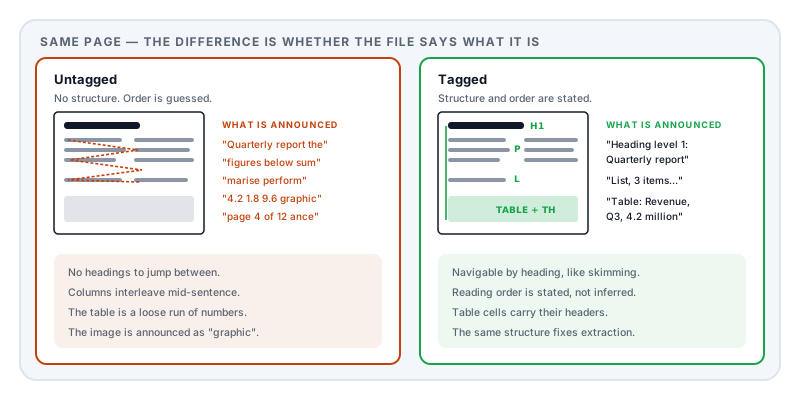
Open a PDF, turn on your reader’s read-aloud feature, and listen. On a well-made document you hear headings announced, lists counted, and the text in the order it was written. On most documents you hear something between a shuffle and a scramble — the page number read in the middle of a sentence, a two-column layout alternating between columns, an image passed over in silence.
The reason is the same fact that underlies half the problems on this site: a PDF stores appearance, not meaning.
There is no heading in a PDF
A PDF’s content is a sequence of drawing instructions: set this font at this size, move to this coordinate, show these glyphs. Nothing in that says this is a heading, these six lines are a list, this is a table with three columns, or this paragraph follows that one.
Sighted readers reconstruct all of it instantly from visual cues — bigger text is a heading, indented text with bullets is a list, aligned columns are a table. A screen reader cannot see those cues. It has only what the file states.
If the file states nothing, the reader falls back to guessing from the order the drawing instructions happen to appear in — which is the producer’s internal order, not necessarily reading order. On a single column of prose it usually works. On anything with columns, sidebars, headers, footnotes, or tables, it produces fragments.
Tagged PDF is the answer, and it is a real thing
PDF has a solution built in: a structure tree stored alongside the drawing instructions, stating explicitly that this is a level-2 heading, this is a paragraph, this is a list with these items, this is a table with these header cells — and the order they are read in.
A document carrying that tree is a tagged PDF, and it is the foundation of ISO 14289, the PDF accessibility standard usually called PDF/UA.
Here is the part worth internalising, because it recurs across this whole subject: the structure that makes a document accessible is the same structure that makes it machine-readable. It is why a tagged PDF converts to Word cleanly while an untagged one falls apart, and why it survives an applicant tracking system while a two-column CV does not. A screen reader and a parser have the same problem: understanding a document without seeing it.
So this is not charity work bolted onto the end of a project. It is the same investment that makes documents work everywhere else.
What a document actually needs
A text layer. Non-negotiable. A scan is a photograph of words — there is nothing to read aloud. It needs OCR first, and OCR gives you text without structure, so it is a start rather than a finish.
A reading order. The sequence the content is meant to be consumed in, stated rather than inferred.
Heading levels that nest properly. H1, then H2, then H3 — not “large bold text”. Screen reader users navigate by jumping between headings, in the same way sighted readers skim. Skipping from H1 to H4, or faking a heading by enlarging a paragraph, removes that navigation entirely.
List and table structure. A list should be announced as a list of six items. A table needs header cells identified, so the reader can say “Revenue, Q3, 4.2 million” instead of reading a grid of loose numbers.
Alt text on images that carry meaning, and images that carry none marked as decorative — otherwise the reader announces “graphic” repeatedly for every rule and flourish.
A document language. One attribute, frequently missing, and without it a screen reader may pronounce the whole document with the wrong phonetics.
Content that does not depend on colour alone. “The items in red are overdue” is unusable to someone who cannot see the colour, and to anyone printing in greyscale.
The compliance picture
This has moved from good practice to legal obligation in your main markets.
In the European Union, the European Accessibility Act — Directive (EU) 2019/882 — was adopted in 2019, required transposition by member states in 2022, and its obligations began applying to covered economic operators on 28 June 2025. Compliance is assessed against the harmonised standard EN 301 549, which incorporates WCAG 2.1 level AA. It covers e-commerce, banking, transport, telecommunications and other consumer-facing services, and it reaches the documents those services give consumers, not just their websites.
In the United States, Section 508 of the Rehabilitation Act has required federal agencies and their suppliers to produce accessible electronic documents for years, also referencing WCAG.
The practical effect for a business is that customer-facing PDFs — statements, contracts, terms, invoices, manuals — are now in scope in a way they were not before.
How to check
Read it aloud. Most desktop readers have a read-out-loud mode. Listen to the first page. Does it announce headings? Does it read columns in order? Does it skip anything?
Look for a tagged indicator. Document properties in most desktop readers show whether the file is tagged.
Run the accessibility checker your reader provides. It will flag missing alt text, missing language, and untagged content.
Tab through it. If there are form fields or links, the tab order should follow the visual order.
Copy all the text out. If what you paste is scrambled, a screen reader hears the same scramble — the two failures are the same failure.
How to produce one
Structure at the source. This is the whole game. Use real heading styles in your authoring tool rather than enlarging text. Use real lists. Use real tables with header rows. Write alt text as you insert images, not afterwards.
Retrofitting is hard and often unsatisfying. A tag tree has to reflect genuine structure, and if the original document expressed its headings only by making text bigger, there is nothing for a tool to work from. Tools exist, and the work is manual and slow. Generating from a structured source beats repairing.
Export to a standard. If your authoring tool can target PDF/UA, use it, and validate the result independently — claiming conformance and achieving it are different things.
Where Lemmafour fits
Markdown to PDF generates documents from a structured source, which is the reliable path described above. Markdown is structure: a heading is a heading because you wrote it as one, a list is a list, a table has header cells. That structure is carried into the output rather than inferred from it.
Set the target standard in one frontmatter line:
pdfProfile: pdf-ua-1The available values are tagged (an ordinary tagged PDF, and the free default), pdf-ua-1 for the accessibility standard, pdf-a-2u for archival with Unicode-mapped text, and pdf-a-2a-ua-1 for archival plus full accessibility tagging. The standards-targeted profiles require a Day Pass or Pro.
With an accessible profile set, the editor tells you when a figure has no alt text or an equation has no spoken form, so you fix it while writing rather than at validation. Equations take a spoken form directly:
:::equation{#eq:model alt="y equals beta zero plus beta one x plus epsilon"}Two honest limits. We do not ship a validator — target a standard, then verify independently if it matters. And this generates documents; it does not repair existing ones. If you have an untagged PDF from elsewhere, go back to the application that made it.
If the document in question is a thesis, accessibility is usually one requirement among several that a repository checks at once — getting a thesis past the submission checks covers the rest of them together.
Sources and further reading
- ISO 14289-1, PDF/UA-1 — the PDF accessibility standard defining the structure tree, tagging requirements and conformance.
- Directive (EU) 2019/882, the European Accessibility Act — obligations applying to covered economic operators from 28 June 2025.
- EN 301 549 — the harmonised European standard for ICT accessibility, incorporating WCAG level AA.
- W3C, Web Content Accessibility Guidelines (WCAG) 2.1 — the underlying success criteria referenced by both EU and US law.
- Section 508 of the Rehabilitation Act, 29 U.S.C. §794d — the US federal requirement for accessible electronic documents.
- ISO 32000-2:2017, the PDF 2.0 specification — the structure tree, marked content, and the artifact designation for decorative elements.