You apply for a role you are clearly qualified for. You hear nothing. You assume the market is brutal, or that a human read it and passed.
Often a human never saw it — and often the reason is not your experience but the shape of your file.
It is worth being precise about this, because the internet is full of overconfident claims about “beating the ATS”. The most substantial research on the subject is a 2021 Harvard Business School and Accenture study, Hidden Workers: Untapped Talent, which surveyed more than 2,250 executives across the US, UK and Germany. It found that 88% of employers said qualified, high-skilled candidates were filtered out because they did not match rigid criteria — rising to 94% for middle-skill roles — and that essentially all large employers now screen this way.
The study’s own conclusion is that the criteria are the main problem, not formatting. That is true, and it is not something you control. What you do control is whether the system can read your document accurately enough to judge you against those criteria at all. If your fifteen years of experience are extracted as scrambled fragments, you fail a filter you would otherwise have passed.
What the machine actually does
An applicant tracking system does not read your CV — or résumé, if you are applying in the US — the way you do. It performs two steps.
First it extracts the text. The PDF is stripped down to a plain stream of characters — no layout, no columns, no font sizes, no visual hierarchy. Just words in the order the file yields them.
Then it infers structure from that stream: where employment history starts, which lines are job titles, which are dates, which are employers.
Everything depends on the first step. If extraction produces a jumble, the second step is inferring structure from noise, and no amount of good experience survives it.
The critical fact: a PDF has no reading order
This is the root of nearly every CV parsing failure, and almost nobody outside the format’s world knows it.
A PDF does not store paragraphs, columns, or sections. It stores drawing instructions: place this run of glyphs at these coordinates on the page. The visual structure you see — two columns, a sidebar, a neat header — exists only because the instructions happen to put ink in those positions. Nothing in an ordinary PDF says which text follows which.
When software extracts text, it has to reconstruct an order that was never recorded. In practice it usually follows the order the instructions appear in the file, which is the order the producing application chose to write them. For a single column of prose, that order matches reading order and everything works.
For a two-column layout, it very often does not.
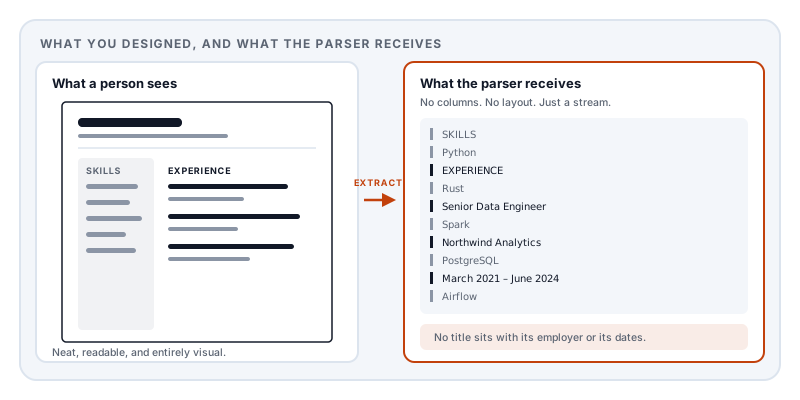
A CV with skills down the left and employment down the right can extract as alternating fragments: a skill, half a job title, another skill, a date. To a parser looking for “job title followed by employer followed by dates”, that is unreadable. Your experience is in the file. It is not recoverable as experience.
The failure modes, in rough order of severity
The CV is an image. Exported as a picture, or printed and scanned, or built in a design tool that rasterised everything. There is no text, so extraction returns nothing at all. This is the total failure, and it is more common than you would think — some design applications rasterise text with effects applied. How to tell whether a PDF contains real text takes one keystroke.
Two columns, or a sidebar. As above. The most common serious failure among otherwise well-made CVs, and the most damaging, because these templates are marketed as professional.
Tables used for layout. Table cells extract in a defined order that may not match how the table reads visually — commonly row by row, so a two-column table of dates and roles emerges as a run of dates followed by a run of roles, with nothing connecting them. Many CV templates use invisible tables for alignment, so this happens to people who do not know they used a table.
Contact details in the page header or footer. Header and footer content sits outside the main content flow and is frequently skipped or extracted separately. Losing a phone number and email is a uniquely expensive formatting error.
Text boxes and graphics. Skill ratings drawn as filled circles, icons standing in for section labels, a name set as a logo. None of it is text. A parser cannot see a five-dot rating, and if a heading is an icon rather than the word “Experience”, the section boundary is invisible.
Ligatures and unusual glyphs. Typesetting replaces the pair f + i with a single combined glyph. Without a correct character map, that copies as one odd character or vanishes — turning “office” into “ofice”, which no keyword match will find. Decorative bullets and dingbats similarly extract as junk that breaks up lines.
A broken character map. The document renders perfectly and extracts as gibberish, because the file lacks the table connecting glyph codes back to real characters. This is the same failure described in the text selection article, and here its consequence is your whole CV arriving as WKH#TXLFN.
The ten-second test that shows you the truth
Skip the paid “ATS scan” tools. You can see almost exactly what the parser sees:
- Open your CV in any PDF reader.
- Select all —
Ctrl+AorCmd+A. - Copy.
- Paste into a plain text editor. Notepad, TextEdit in plain mode, or any code editor.
Read what appears. That text, stripped of all layout, is close to what an applicant tracking system receives.
If your job titles sit next to their employers and dates, in order, you are in good shape. If your skills list is interleaved with your work history, if your name is missing, if words are fused or broken, that is the version of you being assessed.
Do it before you send anything. It is the single highest-value five minutes in a job search, and it costs nothing.
Why accessibility and machine-readability are the same problem
Here is the insight that makes all of this coherent, and it is genuinely useful beyond CVs.
PDF has a solution to the missing reading order: tagged PDF. A tagged document carries a structure tree alongside the drawing instructions — an explicit statement that this is a heading, this is a paragraph, this is a list, and this is the order they are read in. It is the foundation of the PDF accessibility standard, ISO 14289 (PDF/UA), and it exists so that a screen reader can present a document coherently to someone who cannot see the layout.
A screen reader and a CV parser have exactly the same problem: both need to understand a document without being able to see it. The structure that lets a blind reader navigate your CV is the same structure that lets a parser find your employment history.
So this is not a trick or a workaround. Building a CV that machines can read is building a CV that is genuinely accessible — and the reverse is true too. A CV that fails a screen reader will usually fail a parser.
That reframing matters because it tells you what to optimise. Not keyword stuffing. Not white text hidden on a white background, which modern systems detect and which reads as deception when found. Clear, linear, properly structured content.
What to do
One column. Not a compromise, not a fallback — the correct choice for a document that will be read by software. Save the two-column layout for a version you hand to someone in person.
Real text everywhere. No skills-as-graphics, no name-as-logo, no section headings that are icons. If it carries meaning, it must be text.
Standard section headings. “Experience”, “Education”, “Skills”. Parsers match against known vocabularies, and “Where I’ve Made An Impact” is not in them.
Contact details in the body, at the top of the first page, not in the page header.
Consistent date formats. Pick one — March 2021 – June 2024 — and use it for every entry. Parsers infer date ranges by pattern, and inconsistency breaks the pattern.
No tables for layout. If you are using one to align dates against roles, use ordinary lines instead.
Embed your fonts, so the document renders correctly everywhere and does not substitute into a different layout on the recruiter’s machine.
Then run the copy-paste test again.
Building one this way
Markdown to PDF produces CVs with these properties as a consequence of how it works rather than as a feature you have to configure.
Set template: resume in the frontmatter and you get a single-column layout with tight 16mm margins and no automatic section numbering — the right defaults for a CV. Because the document is generated from structured Markdown, the content order in the file is the reading order: your headings are headings, your bullet lists are lists, and there is no visual arrangement fighting the underlying sequence.
Fonts are embedded in every document it produces. The output is a tagged PDF by default, which is the structure layer described above. If you want the full accessibility standard, set pdfProfile: pdf-ua-1. The ordinary tagged output is free; the standards-targeted PDF/UA profile requires a Day Pass or Pro and should still be checked with an independent validator.
A minimal, well-formed CV source looks like this:
---
title: Daniel Reyes — Curriculum Vitae
template: resume
pdfProfile: pdf-ua-1
---

# Daniel Reyes

Seattle, WA · daniel.reyes@example.com · +1 206 555 0148

## Experience

### Senior Data Engineer — Northwind Analytics
**March 2021 – June 2024**

- Rebuilt the ingestion pipeline, cutting nightly batch time from 6 hours to 40 minutes.
- Led a team of four across two time zones.

### Data Engineer — Meridian Systems
**August 2018 – February 2021**

- Designed the event schema still used across three product lines.

## Education

### BSc Computer Science — University of Washington
**2014 – 2018**

## Skills

Python, Rust, Apache Spark, PostgreSQL, dbt, Airflow
Written this way, the copy-paste test returns very nearly the source you wrote. That is the whole objective.
If you are drafting with a language model, AI Markdown to PDF covers that workflow — and asking for Markdown rather than a formatted document sidesteps the layout problem entirely, because Markdown has no columns to get wrong.
One honest limitation. Nobody can guarantee how a specific applicant tracking system will parse a specific document — there are many products, they behave differently, and none of them publish their parsers. What you can do is remove the known causes of failure and verify the result yourself with the copy-paste test. That is the whole of the achievable, and it is worth doing.
One more thing worth knowing
A CV is a document with your full name, address, phone number, email, employment history, and education in it. That is an identity dossier.
Uploading it to a free “ATS checker” or “CV optimiser” hands a complete profile to an operator whose retention policy you have not read, in exchange for a score. Lemmafour’s engine runs in your browser — the document is typeset on your own machine and written to your own disk. For this particular document, that seems worth preferring.
Sources and further reading
- Fuller, J. and Raman, M. et al., Hidden Workers: Untapped Talent, Harvard Business School and Accenture, September 2021 — the survey of 2,250+ executives behind the figures quoted above.
- Harvard Business School, Managing the Future of Work — the project page for that research.
- ISO 32000-2:2017, the PDF 2.0 specification — defines text-showing operators, glyph positioning, the ToUnicode CMap, and the tagged-PDF structure tree that supplies an explicit reading order.
- ISO 14289-1, PDF/UA — the accessibility standard built on that structure tree; the same machinery that makes a document readable by a screen reader makes it parseable by software.
- The Unicode Standard — the character model behind ligature and combining-character extraction problems.