You need to change one paragraph in a report. You only have the PDF. You run it through a converter, open the result, and it is a disaster: text in floating boxes that will not reflow, tables collapsed into columns of orphaned numbers, headings that are just large text, and a document that fights every edit.
The instinct is that you picked a bad converter. Usually you did not. The task you asked for is, in the strict sense, underdetermined — the information required to do it correctly is not in the file.
A PDF does not contain paragraphs
This is the fact everything else follows from, and it surprises nearly everyone.
A Word document stores meaning. It records that this is Heading 2, that this is a paragraph, that these rows form a table with these cells, and that this list has four items. The visual appearance is generated from that structure when you open it.
A PDF stores appearance. Its content is a sequence of drawing instructions: set this font at this size, move to this coordinate, show these glyph codes. That is essentially all.
There is no paragraph. There is no column. There is no table — a table in a PDF is text drawn at aligned positions, sometimes with lines drawn near it. There is not even a reliable notion of a word, because the gaps between words are frequently not space characters at all but instructions to move the drawing position along the line. Many subsetted fonts contain no space glyph, because the document never draws one.
Converting to Word means reconstructing every one of those concepts from coordinates.
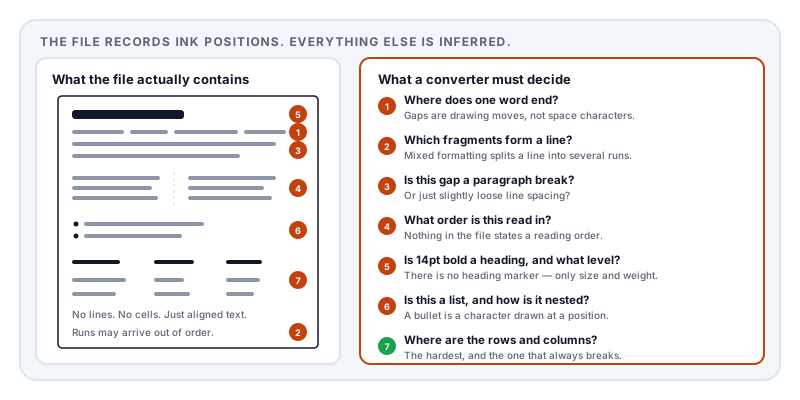
What the converter has to guess
Run through it in order and the difficulty compounds at each step.
Where words begin and end. Measure the gap between glyphs and decide: is 3.2 points a word break, or wide letter-spacing? Get the threshold wrong and you produce thereport or t h e r e p o r t. Justified text makes this worse, because word spacing is stretched to fill the line — so the same document uses different gaps on different lines.
Which fragments form a line. Text is not necessarily drawn left to right. A producer may emit a line in several runs, out of order, especially with mixed formatting.
Where paragraphs break. Vertical gap is the only real signal, and it has to be distinguished from ordinary line spacing. A slightly loose leading reads as a paragraph break; a tight one merges two paragraphs.
The reading order. With a single column this is usually the drawing order. With two columns it frequently is not, and the text interleaves — the same failure that wrecks CVs in applicant tracking systems. Sidebars, pull quotes, and footnotes all compete for a place in the sequence.
Which text is a heading. There is no heading marker. The converter has font size, weight, and spacing, and must decide that 14pt bold is Heading 2 while 13pt bold is Heading 3 — and stay consistent across forty pages and any inconsistencies the original author introduced.
Which lines are a list. A bullet is a character drawn at a position. Whether it is a list, and what its nesting is, has to come from indentation.
Where the tables are. The hardest by a distance. If the table has ruled lines, the converter can find them and guess a grid. If it does not — and a great many do not — there is nothing but aligned text. Then merged cells break the grid, multi-line cells look like separate rows, and a right-aligned numeric column looks like a different column from a left-aligned one.
Why you get a page of text boxes
Given all that, a converter has two strategies.
It can commit to a structural interpretation — decide these lines are a paragraph, this is a table, this is Heading 2 — and produce a genuinely editable document that reflows. When the inference is right, this is excellent. When it is wrong, the document is visibly wrong.
Or it can preserve appearance by placing each fragment in an absolutely positioned text box at the coordinates it had in the PDF. This reproduces the original almost perfectly and is nearly useless: nothing reflows, editing one sentence pushes text out of its box, and the document has no structure to work with.
Most converters choose the second for anything they are unsure about, because looking correct on open is what users judge them by. That is why the output looks right and behaves terribly.
This is a live research problem
If reconstructing a document’s structure were solved, there would be no reason to keep benchmarking it.
There is an active research field — document layout analysis — devoted to exactly these questions, and current work still treats them as open. OmniDocBench, presented at CVPR 2025, evaluates document parsing systems across text, formula, table, and reading order extraction as separate scored categories. Reading order being a benchmark metric in 2025 tells you plainly that recovering it is not a solved problem, and table extraction is consistently reported as the hardest element.
So when a conversion mangles a table, that is not a defective product. It is the current state of a genuinely hard inference problem, being attempted on a file that was never designed to support it.
The asymmetry
Going the other way is easy, and the contrast explains everything.
Word to PDF is a projection: rich structure is used to compute an appearance, and then most of the structure is discarded because a PDF does not need it to display the page. Information is deliberately thrown away.
PDF to Word is an attempt to invert that projection — to recover the discarded information from what remains. Sometimes the evidence is sufficient and the reconstruction is right. Often several structures would produce the identical appearance, and no amount of engineering can distinguish them, because the page genuinely does not record which one was meant.
The exception: tagged PDFs
There is a category that converts far better, and it is worth knowing because you may be able to ask for it.
A tagged PDF carries a structure tree alongside the drawing instructions: an explicit record that this is a heading at this level, this is a paragraph, this is a list with these items, this is a table with these cells, and this is the order they are read in. It exists for accessibility — it is the foundation of ISO 14289 (PDF/UA) and lets a screen reader present the document coherently.
For a tagged document, a converter does not have to guess. The structure is stated.
This is the same insight as the CV article: the structure that makes a document accessible is the structure that makes it machine-readable. It is also why PDF/A conformance at level A requires tagging — an archive wants documents whose meaning survives, not just their appearance.
If you routinely receive PDFs you have to convert, asking the sender for tagged output is a more effective intervention than trying more converters.
What to do instead
Go back to the source. Whoever produced the PDF has the original. One email is faster and better than any conversion, and this is the answer far more often than people try.
Keep your own sources. The most common version of this problem is converting your own document because the original was lost. Treat PDF as an output format, not a working format.
If you must convert, expect to rebuild the tables by hand. Convert for the text, accept that structure will need work, and budget for it rather than fighting the tool.
Check whether the PDF has real text at all. If it is a scan with no text layer, no converter can do anything without OCR first, and the errors OCR introduces are then baked into everything downstream.
Expect fonts to change. The converted document references fonts by name, and if the recipient’s machine lacks them, substitution moves every line break.
Where we stand on this
Lemmafour does not convert PDF to Word, and it is worth being direct about why rather than treating it as a gap in the product. For a large class of real documents, the operation cannot be done reliably, and a tool that promises otherwise is promising an inference it cannot guarantee.
Our approach inverts the problem. Markdown to PDF generates the PDF from a plain-text source you keep. The source stays editable forever, so the round trip never has to happen: change the Markdown, regenerate the PDF. The structure is never lost, because it was written down explicitly rather than being implied by where the ink landed.
That is not useful when a PDF is the only copy you have and someone else made it. In that case the honest advice is the first item on the list above — ask them for the original.
Sources and further reading
- ISO 32000-2:2017, the PDF 2.0 specification — defines text-showing operators, glyph positioning, and the tagged-PDF structure tree that supplies the structure conversion otherwise has to infer.
- Ouyang, L. et al., OmniDocBench: Benchmarking Diverse PDF Document Parsing with Comprehensive Annotations, CVPR 2025 — evaluates text, formula, table and reading-order extraction as distinct problems.
- ISO 14289-1, PDF/UA — the accessibility standard defining the structure tree that makes reliable conversion possible.
- ISO 19005-2, PDF/A-2 — the archiving standard whose level A conformance requires that structure to be present.
- The Unicode Standard — the character model behind word-boundary and ligature problems in extraction.