Every proposal exists twice. There is the document you send the client — scope, approach, price, timeline — and the one your own side needs: what the price is actually built from, where the floor is, which parts of the scope worry delivery, and what you are prepared to concede.
Most teams handle this by keeping two files. That works until it doesn’t, and the failure modes are expensive: the scope changes in the client copy and not the internal one, so delivery plans against superseded terms. Or, memorably, the wrong file goes out.
One source, two documents
Markdown to PDF builds both from a single file. The frontmatter declares which versions exist:
---
title: Warehouse Automation Proposal
author: Northwind Consulting
recipient: Meridian Systems
date: 2026-08-14
version: "1.2"
template: proposal
variants: [internal, client]
variant: client
titlePage: true
toc: true
---
Then anything for your side only goes in a variant block:
::::variant{include="internal"}
:::callout{kind=warning}
**Floor:** $84,000. Below that the integration phase is unprofitable.
Negotiation room is in the timeline, not the price.
:::
::::
Switch variant: client to variant: internal, export again, and you have the working copy. The scope, approach and schedule are identical in both because they are literally the same text. They cannot drift.
The client-ready proposal template and Client proposal recipe are professional choices that require a Day Pass or Pro. You can use the same source and variant technique with the free report template and build the sections manually if you do not need the proposal-specific cover and layout.
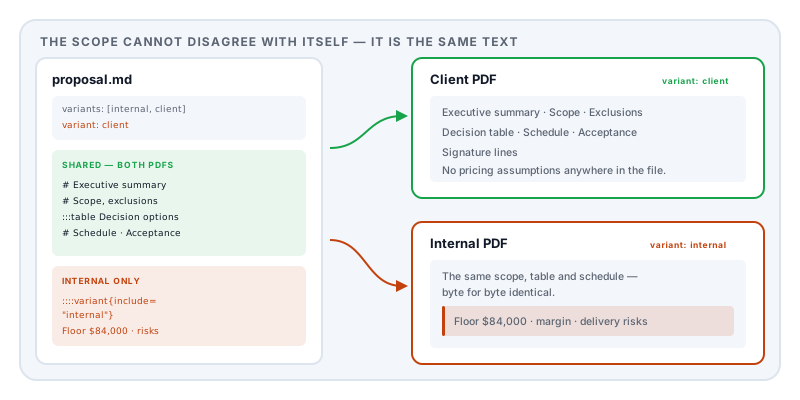
It works in the other direction too. :::variant{exclude="internal"} keeps content out of the working copy — useful for client-facing boilerplate, standard terms, and the marketing preamble your delivery team does not need to read every time.
The structure a proposal wants
The built-in Client proposal recipe sets up a working document with the sections that actually get read:
Executive summary — the outcome, the value, and the decision being requested. Written last, read first, and often the only page a decision-maker reads in full.
Scope — inclusions, and just as importantly exclusions, assumptions and dependencies. Most disputes six months later are about something nobody wrote down.
A decision table, which is the part worth copying even if you take nothing else:
:::table{#tbl:decision caption="Decision options" layout=auto}
| Option | Benefit | Cost | Risk |
| --- | --- | --- | --- |
| Recommended | Primary benefit | Estimate | Managed risk |
| Alternative | Other benefit | Estimate | Tradeoff |
:::
Presenting options with their trade-offs, rather than a single price, changes the conversation from whether to which — and it gives the person championing you internally something to take to their own committee.
Schedule, acceptance criteria, and signature lines. Acceptance criteria are the second most common source of later argument after scope, and the cheapest to fix in advance.
Frontmatter worth knowing
Beyond the basics, a few fields earn their place in commercial documents:
| Key | Why it matters |
|---|---|
recipient | Names the client on the title page — and makes an accidental reuse obvious |
version | Proposals get revised; a visible version number prevents arguing about which one was agreed |
template: proposal | Sets margins, a title page, and heading numbering appropriate to the format |
toc: true | Worth it beyond about eight pages |
header / footer | Put the client name and version in the running footer, where it survives printing |
Signing it
The recipe ends with signature lines, and if the proposal is being signed rather than merely accepted by email, it is worth knowing what that signature is and is not. A drawn or typed signature is an electronic signature, which is legally effective for ordinary commercial agreements in the EU, US, UK, Canada, Australia and Japan — but it is not a cryptographic digital signature and does not detect later alteration. Is an electronically signed PDF legally binding covers the distinction and the exclusions.
Practical version: keep the whole agreement as one file, keep the email thread, and have both sides retain a copy immediately.
Drafting with a language model
Proposals are formulaic in structure and specific in content, which is exactly where a model is useful. Paste this above your request:
Write this as a Markdown proposal for the Lemmafour Markdown-to-PDF engine.
Frontmatter: title, author, recipient, date, version,
template: proposal,variants: [internal, client],variant: client,titlePage: true,toc: true.Sections: Executive summary, Scope (with exclusions, assumptions and dependencies), a decision table as
:::table{#tbl:decision caption="Decision options" layout=auto}with Option / Benefit / Cost / Risk columns, Schedule, Acceptance, and signature lines.Put pricing assumptions, margin and negotiation limits inside
::::variant{include="internal"}containing a:::callout{kind=warning}block. Output only Markdown, in one code block.The engagement is: [your scope, client type, and budget range]
Keep the actual numbers out of the prompt. The model is good at structure; the commercially sensitive figures belong in the editor on your own machine.
Why local matters here
A proposal contains your pricing model, your margin assumptions, your delivery risks and your client’s name. In aggregate across a year, your proposal folder is a description of how your business makes money.
The engine runs in your browser: the document is typeset on your machine and written to your disk. For the internal variant in particular — the one with the floor in it — that is not a small distinction, and it is the reason to draft here rather than in a web converter.
One last discipline: check the variant before you send. The filename should say which one it is. Proposal_Meridian_v1.2_CLIENT.pdf takes two seconds to write and removes an entire category of career-defining mistake.
Sources and further reading
- Regulation (EU) No 910/2014 (eIDAS) — the legal effect of electronic signatures on commercial agreements in the EU.
- 15 U.S.C. §7001, the ESIGN Act — the equivalent US provision.
- ISO 32000-2:2017, the PDF 2.0 specification — document structure, metadata, and signature dictionaries.