Every freelancer, consultant, agency and designer runs into the same conflict. The strongest evidence you can show is real work you did for a real client — and that work is the client’s, often under an agreement you signed without reading closely.
This is probably the most common professional redaction outside law and medicine, and it is the one with the least guidance written about it.
Start with the contract, not the file
Before deciding what to black out, find out what you are permitted to show at all. Look for:
- A confidentiality or non-disclosure clause. Many prohibit disclosing the existence of the engagement, not merely its contents. Removing the logo does not help if you are barred from saying you worked for them.
- An intellectual property assignment. If the deliverable was assigned to the client, the artefact is theirs. Your process, methodology and skill remain yours.
- A publicity or reference clause. Some contracts explicitly permit portfolio use, sometimes subject to approval. This is the clause you want.
- Survival terms. Confidentiality obligations usually outlive the engagement, often indefinitely.
Then ask. Clients say yes more often than people expect, and a client who agrees to be named is worth far more than three anonymised case studies — a named reference is evidence; an anonymous one is a claim.
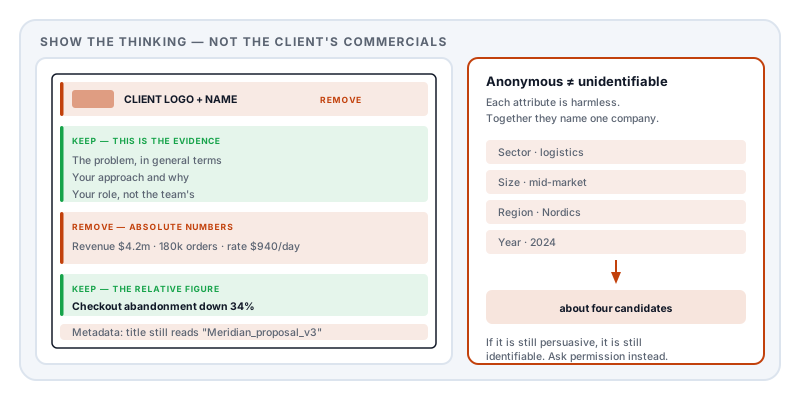
What to remove
- Client name, logos, and brand marks, including in favicons, footers, watermarks and file names
- Product and internal project code names, which are frequently searchable
- Pricing, rates, margins and contract values
- Absolute business metrics — revenue, order volumes, user counts, conversion figures
- Real user or customer data in any screenshot: names, emails, addresses, order records
- Internal URLs, environment names, ticket references and system identifiers
- Named individuals — the client’s staff and, usually, your colleagues
- Unreleased features or roadmap material, which can be commercially damaging well after the engagement
- Document metadata, which routinely carries the client name in the title or author field long after it has been removed from the visible page
What you can usually keep
The valuable part of a work sample is rarely the client’s confidential material. It is the demonstration that you can think:
- The problem stated in general terms
- Your approach and the reasoning behind it
- Your specific role — what you did as opposed to what the team did
- The outcome as a relative figure — “cut page load from 4.1s to 1.2s” or “reduced abandonment by 34%”
- Craft artefacts — wireframes, architecture sketches, a code structure, a research protocol — with identifying detail removed
Relative figures are the trick. Percentages and multiples communicate achievement without disclosing the underlying commercial numbers, and they are what a prospective client is actually assessing.
Anonymised is not the same as unidentifiable
This is where most portfolio redaction quietly fails.
You remove the name and write “a mid-market logistics company in the Nordics, 2024, migrating from a legacy warehouse system”. To a general reader that is anonymous. To anyone working in Nordic logistics it is a shortlist of about four companies, and to someone who knows the sector it is one.
The identifying power is in the combination: sector plus size plus region plus timeframe plus the distinctive detail that makes the story worth telling. Each attribute is harmless; together they resolve to a single organisation. It is the same effect that makes research interview transcripts re-identifiable even after every name is removed.
If you need genuine anonymity, generalise more than feels necessary: a region rather than a country, a range rather than a year, a sector rather than a niche. If that leaves the case study too vague to be persuasive — which it often does — that is the real signal that you should be asking the client for permission instead.
Screenshots need particular care
A product screenshot is where real user data escapes. Check the edges as carefully as the centre: usernames and avatars, email addresses in a header, records in a table, internal navigation naming systems and teams, a browser tab strip listing everything else you had open, and file paths containing your own username.
Where possible, populate the interface with obviously synthetic data before capturing, rather than covering real data afterwards. And never blur or pixelate — both are reversible, as covered in redacting a screenshot.
Watermark what you send
If your portfolio is a PDF you email to prospects, overlay the recipient and date across the page: “Prepared for Meridian Systems, 14 August 2026.”
It will not prevent copying. It makes onward circulation traceable, discourages casual forwarding, and signals to the client — if it ever reaches them — that you handled their material deliberately. Stamp PDF places it across the page rather than in a corner, where it cannot simply be cropped away.
The mistake that undoes it
A black box drawn in a PDF viewer is added as a shape on top of the page. The client name underneath stays in the file, and selecting and copying recovers it — see redaction vs whiteout. For a portfolio circulated to a client’s competitors, that is a genuinely serious failure rather than an embarrassing one.
The same applies to exported design files, which frequently retain layer names, artboard titles and comments containing the client name.
Check before you send
- Select all, copy, paste into a plain text editor. Search for the client name, the product name, and any individual’s name.
- Read the document properties — title, author, subject, keywords. Design and office tools write the original filename here constantly.
- Search the file for your own employer or agency name if you are presenting as an individual.
- Show it to someone in the sector and ask if they can guess the client. If they can, generalise further.
Doing it
Redact PDF removes the selected content from the file and rewrites the document rather than covering it, and clears metadata, attachments and comments in the same operation — which on a portfolio is where the client name usually survives.
It runs in your browser, so a document you are contractually obliged to keep confidential does not get uploaded to a third party as part of making it shareable.
Sources and further reading
- Regulation (EU) 2016/679 (GDPR), Article 5 — data minimisation, applicable to any real user data appearing in a screenshot.
- Regulation (EU) 2016/679 (GDPR), Recital 26 — the test for whether data is genuinely anonymous, turning on the means reasonably likely to be used to identify someone.
- Bland, M., Iyer, A. and Levchenko, K., Story Beyond the Eye: Glyph Positions Break PDF Text Redaction, PoPETs 2023(3):43–61.
- ISO 32000-2:2017, the PDF 2.0 specification — the document information dictionary and XMP metadata, where client names outlive their removal from the page.