Almost every request for a document has the same shape. Someone needs to confirm one specific fact — that you live where you say, that you earn enough, that you are who you claim — and the only document that proves it happens to prove a great deal more.
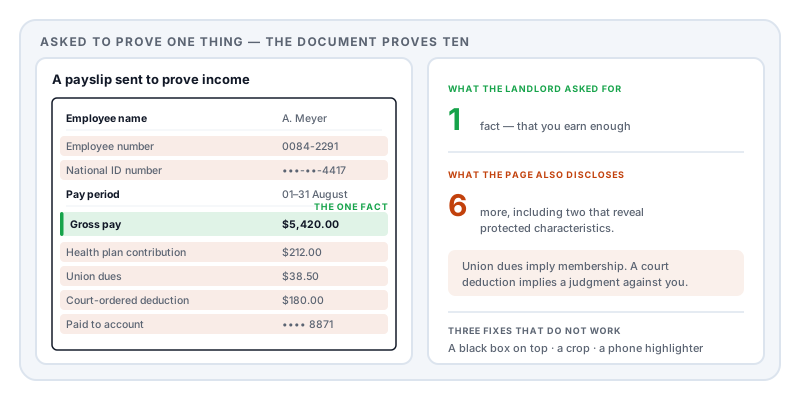
A payslip confirms your salary. It also discloses your national insurance or social security number, your pension contributions, your health plan elections, and any court-ordered deductions. A utility bill confirms your address. It also reveals your account number, your consumption pattern, and whether you have been paying late.
That asymmetry is the whole problem. You are not hiding something shameful; you are declining to hand over twenty facts when one was requested. That instinct has a formal name in European data protection law — data minimisation, Article 5(1)(c) of the GDPR — and it is the standard organisations are held to when they handle your data. It is a reasonable standard to apply to your own.
The document-by-document table
| Document | What they actually need | Remove before sending |
|---|---|---|
| Payslip | Your name, employer, pay period, gross and net pay | National ID number, employee number, bank account details, itemised deductions, year-to-date figures, other household income |
| Bank statement | Name, account holder, closing balance, salary credits | Account and routing numbers, full card numbers, transaction detail, other people’s names, your address if not required |
| Utility bill (proof of address) | Name, address, issue date, issuer | Account and meter numbers, consumption history, payment history and arrears, tariff, direct debit details |
| Passport or ID copy | Name, photo, expiry, issuing country | Document number in full, machine-readable zone at the foot of the page, signature |
| Doctor’s note for an employer | Dates, fitness to work, restrictions | Diagnosis, medication, clinical history, referral details |
| Degree certificate or transcript | Institution, award, date, classification | Student ID, date of birth, individual module marks if only the award is needed |
| Tax document | Income total, tax year, taxpayer name | National ID number, dependants’ details, address history, unrelated schedules |
| Invoice or receipt (warranty, chargeback) | Item, price, date, retailer, order number | Card digits, delivery address, other items on the same order |
| Employment contract (to a lender or adviser) | Role, start date, salary, employer | Bonus structure, restrictive covenants, colleague names, commercial terms |
| Work sample or case study | The work itself, the approach, the result | Client name, logos, contact details, pricing, anything under an NDA |
| A screenshot for a support forum | The error or the behaviour | Email address, account IDs, tokens, order numbers, browser tabs, notifications |
| Interview transcript (research) | The content of the response | Participant name, employer, location, any detail that identifies by combination |
The three mistakes that undo the work
A black box is not a deletion. In most PDF editors, drawing a rectangle adds an instruction to paint a shape on top of the page. The text underneath is still in the file. The recipient selects the area, copies, and pastes it into a text editor, and there it is. This is how governments, law firms, and major corporations have repeatedly leaked exactly the material they meant to hide — the mechanism is set out in redaction vs whiteout.
Cropping is not removing. A crop box tells a viewer which part of the page to display. The rest of the page is still in the file and returns the moment somebody resets the box.
A highlighter on a phone is not opaque. Mobile markup pens and highlighters are designed to imitate real ink, which means they are deliberately semi-transparent. Layering strokes does not fix it. Anyone can open the image in a basic photo editor, push brightness and contrast to the extremes, and read what is underneath. If you must do it on a phone, use a shape tool with a solid fill at full opacity — or better, redact the PDF properly rather than marking up a screenshot of it.
Two things almost nobody thinks about
Metadata. The document’s properties can carry the author’s name, the software that made it, and creation and modification timestamps — sometimes a filename that gives away more than the contents. Redacting the body and leaving the metadata is a common near-miss. What PDF metadata reveals covers it.
The width of the box itself. This one is genuinely surprising. If a redaction leaves a black box exactly as wide as the words it replaced, that width is a measurement of the removed text. Researchers at the Privacy Enhancing Technologies Symposium in 2023 showed this is not theoretical: they recovered names from real redacted documents — including published government investigation reports and freedom-of-information responses — by matching candidate strings against the exact positioning left behind, across eleven different redaction tools including the market leader.
The defence is to quantise the width so the box no longer measures its contents. It is an option worth switching on when the redacted item is drawn from a small, guessable set — a name, a city, a company.
How to check before you send
Whatever tool you used, verify the file you are actually about to send:
- Select all, copy, paste into a plain text editor. Read it. Anything you redacted must not appear. This single test catches black boxes, crops, and hidden OCR layers on scans at once.
- Search the document for a word you removed. If the viewer jumps to a black box, the text is still there.
- Open the document properties and read every metadata field.
If you fixed anything, run the tests again — the fix produced a new file.
Doing it
Redact PDF removes the selected text and image content from the file and rewrites the document, rather than covering it. It clears metadata, attachments and comments as part of the same operation, and after applying it a second engine re-reads the exported file and checks the redacted regions for extractable text, so you are told if anything survived rather than finding out later.
It runs in your browser. That matters more here than almost anywhere else on this site: the documents in the table above are your identity, your income, your address, and your health, and the usual way people sanitise them is to upload the unsanitised original to a free website first.
The deeper guides
- How to redact a payslip — and why the deductions column is the sensitive part
- How to redact a bank statement — proving income without disclosing your life
- How to redact a utility bill for proof of address
- How to send a sensitive document safely — the full pre-send sequence
Sources and further reading
- Regulation (EU) 2016/679 (GDPR), Article 5 — the data minimisation principle: personal data must be adequate, relevant, and limited to what is necessary.
- Bland, M., Iyer, A. and Levchenko, K., Story Beyond the Eye: Glyph Positions Break PDF Text Redaction, Proceedings on Privacy Enhancing Technologies 2023(3):43–61 — recovery of redacted names from character positioning, across eleven redaction tools.
- NIST SP 800-122, Guide to Protecting the Confidentiality of Personally Identifiable Information — the US federal reference on identifying and handling PII.
- ISO 32000-2:2017, the PDF 2.0 specification — content streams, annotations, crop boxes, and metadata: why covering, cropping, and removing are three different operations.