Renting a flat, applying for a mortgage, supporting a visa application, or claiming a benefit all tend to end the same way: please send your last three payslips.
The requester wants one thing — evidence that money of roughly the right size arrives regularly from a real employer. What you are about to send them contains a great deal more, and the most sensitive part is not the salary figure everyone worries about.
It is the deductions column
Look at the right-hand side of a payslip. Every line there is an inference about your life:
- Union dues indicate that you are a union member.
- A health plan or medical insurance contribution indicates a medical arrangement, and sometimes the plan tier reveals whether you cover dependants.
- Payroll charitable giving can indicate religious affiliation or political sympathy, depending on the organisation.
- A court-ordered deduction — an attachment of earnings, a garnishment, a child maintenance order — indicates a judgment against you.
- A student loan repayment indicates educational debt.
- A pension opt-out may indicate financial pressure.
This is not an abstract concern. Under EU data protection law, trade union membership, health data, religious beliefs and political opinions are special category personal data under Article 9 of the GDPR, subject to a higher bar than ordinary personal information. You are about to email all four to a letting agent who asked whether you earn enough to cover the rent.
A landlord is not entitled to know you are in a union. A mortgage adviser has no need for your health plan tier. Neither of them asked.
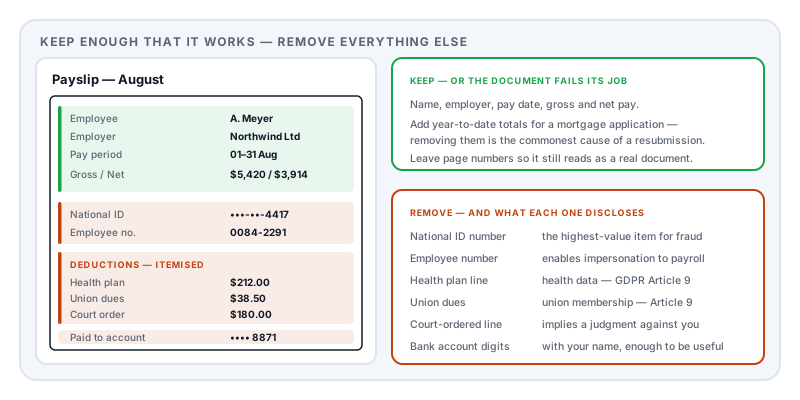
What to keep
Redacting too much gets your application rejected and wastes a week. Leave enough that the document does its job:
- Your name, matching the name on the application
- Your employer’s name and, if present, their address or registration number
- The pay date and pay period
- Gross pay — the figure the whole request is about
- Net pay — lenders and landlords usually want to see take-home too
- The document’s own identity — payslip number, page numbers, anything that makes it look like a real document rather than something assembled
For a mortgage application specifically, leave year-to-date totals as well. Lenders use them to check consistency, and removing them is the most common cause of a request coming back.
What to remove
Your national identification number. The social security number, national insurance number, or equivalent. This is the highest-value item on the page for anyone committing identity fraud, and no landlord or letting agent needs it. If an employer’s payroll system prints it in full, remove it entirely rather than leaving the last digits.
Employee or payroll number. Low value to you, real value to someone attempting to impersonate you to your employer’s HR or payroll department.
Bank account details. Many payslips print the account the salary was paid into. Even partial digits combined with your name and address are useful to a fraudster.
The itemised deductions. As above. If the recipient needs to see that gross and net differ by a plausible amount, leave the total deductions and remove the breakdown.
Your home address, unless the request is specifically about proving where you live — in which case a utility bill is the better document anyway.
Other people’s information. Some payslips carry a manager’s name or an approver. They did not consent to this.
Anything in the footer. Payroll providers often print scheme numbers, tax office references, and internal identifiers in small text at the bottom, and it is routinely missed.
The password-protected payslip
Most payroll portals now issue payslips as password-protected PDFs, usually locked with a date of birth or an employee number.
That protection exists for the journey from your employer to you. It does not need to continue. Open the file with the password you already have and export or print it to an ordinary PDF, then redact that. A recipient who cannot open your attachment will simply ask you to resend it.
One caution: if the password is your date of birth — as it very often is — do not tell the recipient the password. You would be disclosing the exact thing the redaction was meant to protect.
Redacting several months consistently
If you are sending three payslips, redact all three identically. It sounds obvious and it is the most common failure in practice: two are careful and the third, done last and in a hurry, leaves the identification number in place.
The rule is simple. The most exposed document sets your actual level of disclosure. Everything else is decoration.
Cover is not remove
The mistake that undoes everything: drawing a black rectangle in a PDF viewer. Most viewers add that rectangle as a shape on top of the page, and the text underneath is still in the file. The recipient selects the area, copies, and pastes — and there is your national identification number. This is the failure mode explained in redaction vs whiteout, and it is why the fix has to happen inside the file’s content rather than over it.
Two related traps. Cropping the page only changes which region is displayed; the rest is still there. And if you are working from a photo of a printed payslip on your phone, the markup pen and highlighter are deliberately semi-transparent to imitate ink — anyone can recover what is beneath them by pushing brightness and contrast in a basic photo editor. Use a solid shape at full opacity, or redact the PDF properly instead.
A subtlety worth knowing: the width of the box
If a redaction leaves a black box exactly as wide as the text it replaced, that width measures its own contents.
Researchers presenting at the Privacy Enhancing Technologies Symposium in 2023 demonstrated this against real documents, recovering redacted names from published government investigation reports and freedom-of-information responses by matching candidate strings against the character positioning left behind. They tested eleven redaction tools, including the market-leading one, and found the leak in all of them.
For a payslip this matters most where the hidden value comes from a small, guessable set — a deduction type, a scheme name, a city. Quantising the width so the box no longer measures what it replaced closes it.
Check before you send
Three tests on the file you are actually about to attach:
- Select all, copy, paste into a plain text editor. Read every line. Your identification number must not appear.
- Search the document for the last four digits of your national ID and your bank account. Nothing should be found.
- Open the document properties and read the metadata — payroll systems frequently write an employee reference into the title or subject field, where redaction never reaches.
Doing it
Redact PDF removes the selected content from the file and rewrites the document rather than covering it, clears metadata, attachments and comments as part of the same operation, and then re-reads the exported file with a second engine to confirm no text remains extractable in the redacted regions. Width quantisation is available for the cases described above.
It runs entirely in your browser. For this document in particular that is the point: the usual alternative is uploading a file containing your salary, your national identification number, and your bank details to a free website in order to hide your salary, your national identification number, and your bank details.
Sources and further reading
- Regulation (EU) 2016/679 (GDPR), Article 9 — trade union membership, health data, religious beliefs and political opinions as special category personal data.
- Regulation (EU) 2016/679 (GDPR), Article 5 — data minimisation: only what is adequate, relevant and necessary.
- Bland, M., Iyer, A. and Levchenko, K., Story Beyond the Eye: Glyph Positions Break PDF Text Redaction, PoPETs 2023(3):43–61 — recovery of redacted text from character positioning across eleven tools.
- NIST SP 800-122, Guide to Protecting the Confidentiality of Personally Identifiable Information — why national identification numbers rank as the highest-risk identifier.
- ISO 32000-2:2017, the PDF 2.0 specification — content streams and annotations: why a drawn rectangle does not remove what is under it.