You want help with an error, so you screenshot it and post it to a forum, a vendor ticket, or a chat. You scribble over your email address first.
Three separate things can go wrong at that point, and two of them are invisible to you.
1. The pen and the highlighter are not opaque
This is the big one, and it catches almost everybody.
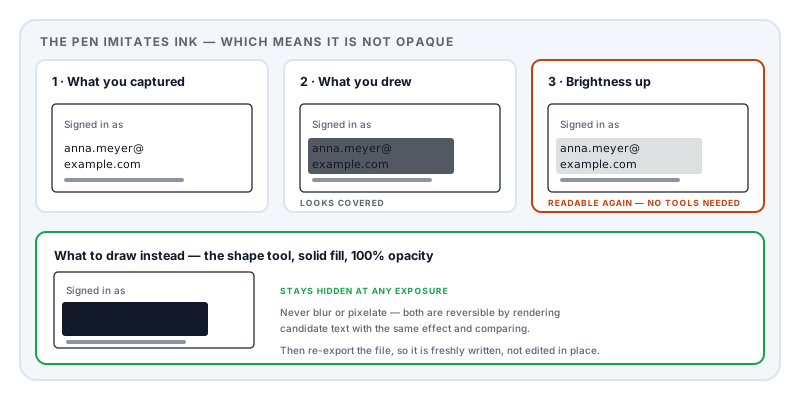
The markup tools built into phones are designed to imitate real ink, which means they are deliberately semi-transparent. Swiping back and forth to build up layers looks convincing on your screen and does not make the ink opaque — it just makes it darker.
Recovering what is underneath requires no skill and no special software. Open the image in any photo editor, including the one already on the phone. Push brightness, exposure and shadows up, drop contrast down. The ink washes out and the text beneath becomes legible. Bank details, addresses, tokens and passwords have all been recovered this way from images posted publicly.
The fix: use the shape tool with a solid fill at 100% opacity, not the pen or the highlighter. Draw a filled rectangle. It is less convenient and it actually works.
2. Blur and pixelation are reversible
Blurring or pixelating text feels like the tasteful option. It is the weakest one.
Both effects are deterministic: the same input always produces the same output. So an attacker who can guess the shape of what was hidden — an email address at a known domain, an account number in a known format, a name from a short list — can render each candidate, apply the identical blur or pixelation, and compare the result against your image until it matches.
This is the same attack shape as the one demonstrated against PDF redactions at the Privacy Enhancing Technologies Symposium in 2023, where researchers recovered redacted names from published government documents by matching candidates against the traces the redaction left behind. Anything that transforms the secret rather than removing it leaves a fingerprint of the secret.
The fix: a solid block. Never blur, never pixelate, never mosaic.
3. Cropping has failed before
Cropping is normally the strongest option, because the pixels genuinely leave the image. But it is worth knowing how it failed, because the lesson generalises.
In 2023, security researchers Simon Aarons and David Buchanan disclosed aCropalypse (CVE-2023-21036). The Markup tool on Google Pixel phones — and, as it turned out, Snip & Sketch and the Snipping Tool on Windows — wrote the edited image over the original file without truncating it. If the new image was smaller, the tail of the original remained in the file after the new one ended. Around 80% of the original screenshot could be recovered, including the parts that had been cropped away or covered.
It was patched in March 2023. The instructive detail is the condition under which it did not work: images that had passed through an intermediate re-encoding were safe, because re-encoding rebuilds the file rather than overwriting part of it.
The fix, and a good habit regardless: after editing, re-export the image — send it through a converter, paste it into a new document, or export it in a different format — so the file you post is freshly written rather than edited in place.
What to actually redact
The content you noticed is rarely the whole problem. The edges are.
In the browser or app itself: your email address or username in the corner, account and customer IDs, order and invoice numbers, session tokens or API keys visible in a URL or a developer console, and internal URLs that disclose your employer’s systems.
In the browser furniture: open tabs — which name every other thing you were doing — the bookmarks bar, the profile avatar and name, and autofill suggestions dropped down over the page.
In the operating system: a notification that arrived mid-capture, the system tray, the clock and date if you are claiming something happened at another time, the taskbar showing which applications you run, and file paths containing your username, which is a very common leak in error dialogs and terminal output.
Other people: names, avatars and message previews in a chat window. They did not agree to appear in your support ticket.
QR codes and barcodes, which survive being small and encode more than they look like they do.
Better than redacting: do not screenshot
Where the content is text, copy the text instead. Error messages, log output, configuration and stack traces are all more useful to whoever is helping you as text than as a picture — searchable, quotable, and trivially editable to remove the sensitive parts before you post.
A screenshot is the right format for a layout problem or a visual bug. For everything else it is a worse medium that happens to be one tap away.
If the screenshot is going into a document
If you are placing screenshots into a report, a claim, or a submission, redact them in the PDF, not in the image beforehand — or better, both. A PDF gives you real removal: Redact PDF takes out the underlying content and rewrites the file rather than covering it, and clears the metadata in the same pass.
Image metadata deserves a mention on its own. Screenshots typically carry the device and the timestamp; photographs of a screen can carry GPS coordinates. Check it before posting, in the same way you would check a PDF’s metadata.
Check before you post
- Open your edited image and push the brightness and contrast to their extremes. If anything appears under your markup, start again with a solid block.
- Zoom to 100% and read every edge — top, bottom, both sides.
- Re-export the file rather than posting the edited-in-place version.
- Check the image metadata for device and location.
None of this takes a minute, and a screenshot posted publicly is not something you can recall.
Sources and further reading
- NVD entry for CVE-2023-21036 (aCropalypse) — the cropped-screenshot recovery vulnerability in Pixel Markup and Windows Snipping Tool, disclosed by Simon Aarons and David Buchanan.
- Bland, M., Iyer, A. and Levchenko, K., Story Beyond the Eye: Glyph Positions Break PDF Text Redaction, PoPETs 2023(3):43–61 — the candidate-matching attack that also explains why blur and pixelation fail.
- NIST SP 800-122, Guide to Protecting the Confidentiality of Personally Identifiable Information — identifying what counts as disclosing information.
- Regulation (EU) 2016/679 (GDPR), Article 5 — data minimisation, including the third parties visible in your chat window.