You are off sick, and your employer asks for a note. The document your doctor gives you is written for a medical context — and it will very often say considerably more than your employer is entitled to know.
What an employer actually needs
Strip the situation to its essentials and there are three questions:
- Are you unfit for work?
- For what period?
- Are there restrictions or adjustments when you return?
That is the whole of what an ordinary sick-leave process requires. The diagnosis is not one of the three — your employer needs to manage your absence, not to treat you.
This is not merely etiquette. In the EU, health data is special category personal data under Article 9 of the GDPR, and an employer processing it needs both a lawful basis and a specific Article 9 condition, most often the one covering obligations in employment and social security law. That condition permits what is necessary for those obligations — not everything a document happens to contain. In the US, the Americans with Disabilities Act restricts medical inquiries of employees and requires medical information to be kept confidential and stored separately from personnel files.
Many countries’ standard sick-note forms are designed with this separation in mind, which is why they foreground fitness and dates rather than clinical findings.
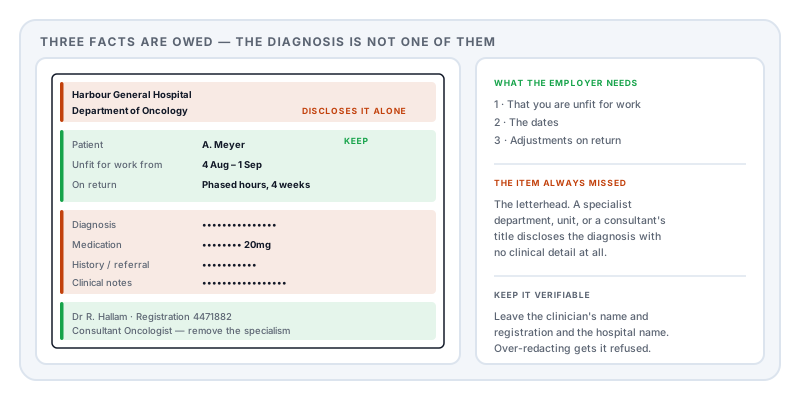
The letterhead is the leak nobody catches
People carefully black out the diagnosis line and send a document printed on paper reading Department of Oncology, Community Mental Health Team, Sexual Health Clinic, or Addiction Services.
The department name discloses the diagnosis without a word of clinical detail. So does a consultant’s title — “Consultant Psychiatrist” beneath a signature says everything the redacted line above it was meant to conceal. So can a clinic’s address, if the site is a specialist unit.
Check the top and the bottom of the page before anything in the middle.
What to remove
- The diagnosis or condition, wherever it appears
- Medication names and dosages
- Clinical history, test results, and referral details
- Free-text clinical notes — often the most revealing part, and frequently at the foot of the page
- The specialist department, unit, or clinic name on the letterhead
- A consultant’s specialism in their title or signature block
- Patient identifiers — hospital number, insurance or health plan member number, and national identification number
- Other appointments or unrelated dates listed on the same page
- Next-of-kin details, where the form includes them
What to keep
- Your name and date of birth, so it is identifiably yours
- The dates of unfitness — the entire point of the document
- The fitness statement itself, including any phased return or adjustment
- The clinician’s name and registration or licence number, so it can be verified
- The issuing practice or hospital name — the organisation, not the department
- The date of issue and any reference number
Removing the verification details is the most common over-redaction, and it results in the note being refused as unverifiable.
When you do have to disclose more
Be clear about the exceptions, because they are legitimate:
- Occupational health referrals — the recipient is a clinician, and the assessment depends on the detail
- Insurance and income protection claims — the insurer is assessing a medical claim
- Requests for a specific workplace adjustment — you may need to explain the limitation, though usually the functional impact rather than the diagnosis
- Some statutory leave certifications, where the form itself demands specified fields
The distinction that helps: the more medical the recipient, the less redaction is appropriate. Your line manager is not a medical recipient.
Send it to the right person
Where your organisation has HR or an occupational health service, send the note there. Fewer people seeing health information is the substance of the protection, and a note forwarded around a team is impossible to recall.
If you have only your manager’s address, it is entirely reasonable to ask whether there is an HR mailbox for medical evidence.
The mistakes that undo it
A black box drawn in a PDF viewer is not a deletion. Most viewers add it as a shape on top, leaving the text in the file where selecting and copying recovers it. See redaction vs whiteout. On this document, the recovered text is your diagnosis.
A photographed note is pixels — unless it has an OCR layer. If a scan was processed for searchability, there is an invisible transcription behind the image, and drawing over the picture does not touch it.
A phone highlighter is semi-transparent by design. Brightness and contrast adjustments recover what is beneath it.
Metadata. Clinical systems generating PDFs frequently write a patient identifier or template name into the document properties.
Check before you send
- Select all, copy, paste into a plain text editor. Search for the condition and any medication name.
- Read the letterhead and footer at full zoom.
- Read the document properties for a patient reference.
Doing it
Redact PDF removes the selected content from the file and rewrites the document rather than covering it, clears metadata in the same pass, and re-reads the export with a second engine to confirm nothing remains extractable.
It runs in your browser — which for a document describing your health, going to your employer, seems the right place for it to stay.
Sources and further reading
- Regulation (EU) 2016/679 (GDPR), Article 9 — health data as special category personal data, and the conditions permitting an employer to process it.
- Regulation (EU) 2016/679 (GDPR), Article 5 — data minimisation.
- Americans with Disabilities Act, 42 U.S.C. §12112(d) — restrictions on employee medical examinations and inquiries, and the confidentiality requirement.
- NIST SP 800-122, Guide to Protecting the Confidentiality of Personally Identifiable Information — assessing disclosure harm.
- ISO 32000-2:2017, the PDF 2.0 specification — why a drawn rectangle does not remove the text beneath it.