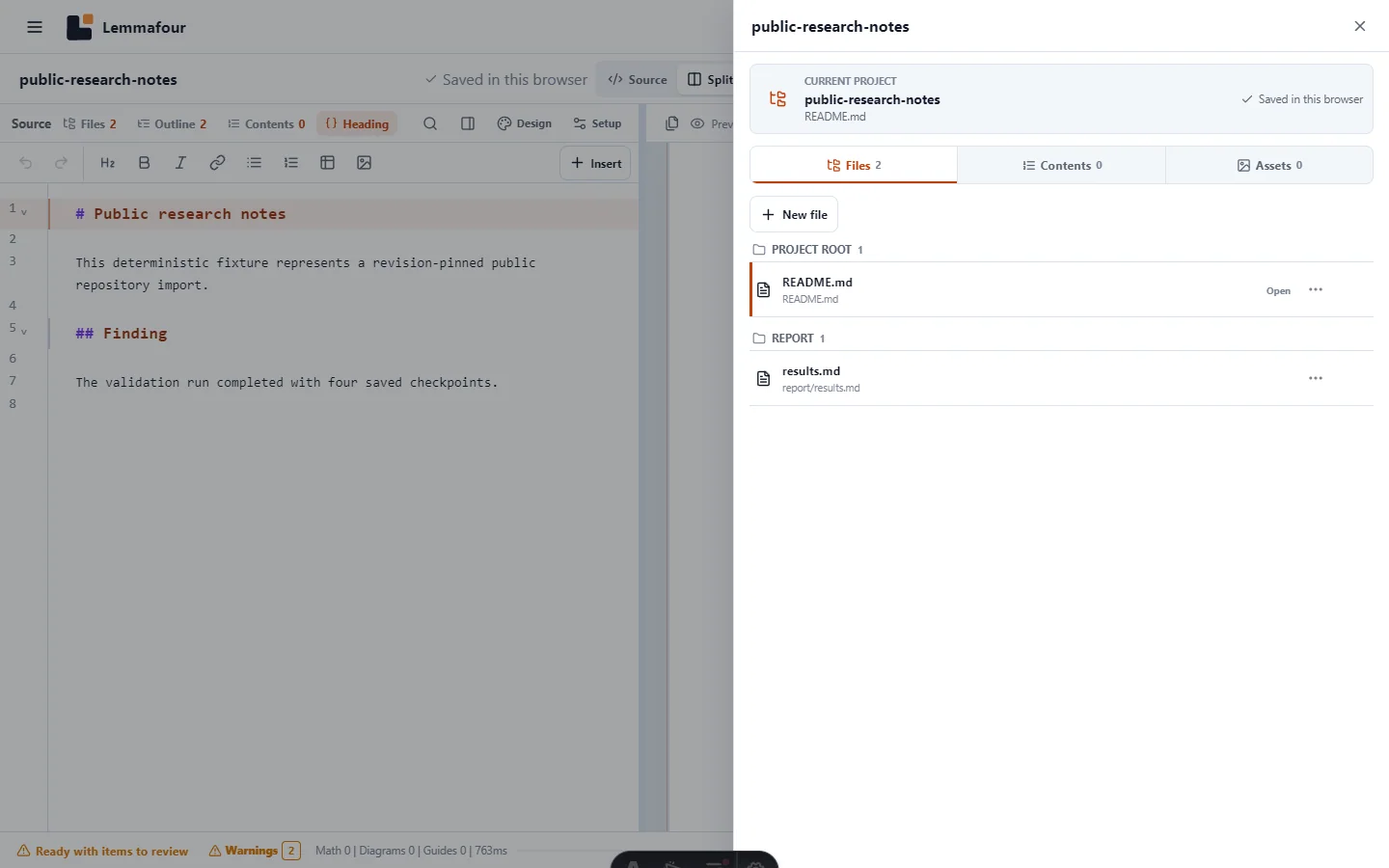
Paste a public GitHub, GitLab.com, or Hugging Face repository, folder, or file URL into Import from public link. Lemmafour recognizes the provider, resolves the current revision, selects supported publishing files within fixed safety limits, and creates an editable local project in the browser.
No provider account is required. The importer does not ask for an access token, clone private history, or gain permission to write to the repository. It reads public HTTPS resources and turns them into a detached project copy.
Choose the narrowest useful link
The importer accepts three useful scopes:
| Link scope | Result |
|---|---|
| Repository | Imports supported publishing files from the project root |
| Folder | Imports the selected subdirectory as the project root |
| Individual file | Imports one Markdown, Quarto, or notebook source with the files the provider contract can resolve for that scope |
Start with the folder that actually contains the report, documentation, book, or notebook collection. A machine-learning repository might contain model checkpoints, environments, raw datasets, and build outputs that have no place in a PDF project. Selecting /docs, /report, or a specific notebook avoids unnecessary provider requests and makes the resulting Files view easier to understand.
Supported providers are deliberately explicit:
- GitHub repository, tree/folder, and blob/file links;
- GitLab.com project, tree/folder, and blob/file links, including nested namespaces;
- Hugging Face model, dataset, and Space repositories, including folder and file links.
Other Git hosts are not guessed from similar-looking URLs. An unsupported host remains invalid instead of being sent to an arbitrary endpoint.
What is fetched
The intake policy selects source and supporting formats used by the publishing engine: Markdown, Quarto, notebooks, YAML, TOML, JSON, BibTeX, CSL, CSV, TSV, and common raster or SVG images. Development directories, generated caches, and unrelated binary files are ignored according to the discovery policy.
At least one Markdown, Quarto, text, or notebook source must remain after filtering. Current limits are:
- no more than 256 selected publishing files;
- no more than 96 MiB across the selected project;
- no more than 8 MiB for an individual source document;
- no more than 32 MiB for an individual supporting file.
These are browser safety and responsiveness boundaries, not paid-plan quotas. A provider can also return a truncated tree before Lemmafour reaches its own limits. When that happens, use a folder URL to reduce the scope.
Files are downloaded with bounded concurrency and progress reporting. The provider revision is resolved first, and the imported origin records that revision. This prevents a branch changing halfway through an import from silently combining unrelated versions of files.
The result is a detached local copy
After import, the repository becomes an ordinary Lemmafour project. Open files, edit source, choose a preview target, create Combined PDF contents, and export just as you would with a local folder or ZIP.
“Local copy” has two consequences:
- Document compilation stays in the browser after the source and application assets have been fetched.
- Changes are not synchronized back to GitHub, GitLab, or Hugging Face.
The initial repository fetch is necessarily a network operation. It would be misleading to call that part offline. The privacy boundary is that Lemmafour does not upload your imported or edited document bytes to its own processing server. Public source bytes come from the provider because you asked to import them; PDF compilation then runs locally.
The project can be saved in browser storage, but clearing site data can remove browser-held projects. Use Download project backup before relying on the copy or moving it to another device.
Import a repository
- Open Markdown to PDF.
- Open File and project actions and choose Import from public link.
- Paste the complete public HTTPS URL.
- Confirm that the intended provider is recognized.
- Choose Import from GitHub, Import from GitLab, or Import from Hugging Face.
- Watch the locating, validating, and downloading progress rather than assuming a large project has frozen.
- Review any ignored-file or safety-limit report before opening the result.
A clean import opens directly. An import needing a decision can show a review step. Once open, inspect Files and confirm that the expected entry document, linked images, bibliography, and configuration are present.
Turn repository files into the intended PDF
Importing a repository does not imply that every document is one book. The file open on the left is the current editing context. The PDF preview can target that file or an explicitly configured Combined PDF. Create and order Combined PDF contents only when the deliverable should contain multiple source documents.
This separation is useful for documentation repositories. You can export a single README, a selected tutorial, several PDFs, or one ordered manual from the same imported copy. Supporting images and references remain assets rather than accidental chapters.
Before export, check diagnostics for unresolved links, missing local images, unsupported notebook outputs, duplicate paths, and references that point outside the imported scope. If an image lives elsewhere in the repository, re-import from a common parent folder or add the missing asset locally.
The downloadable fixture below represents the deterministic repository response used by the browser test. The test mocks provider endpoints but exercises the production URL parser, revision pinning, file policy, project intake, editor, and preview flow. That makes the proof repeatable without depending on a third-party repository remaining unchanged.