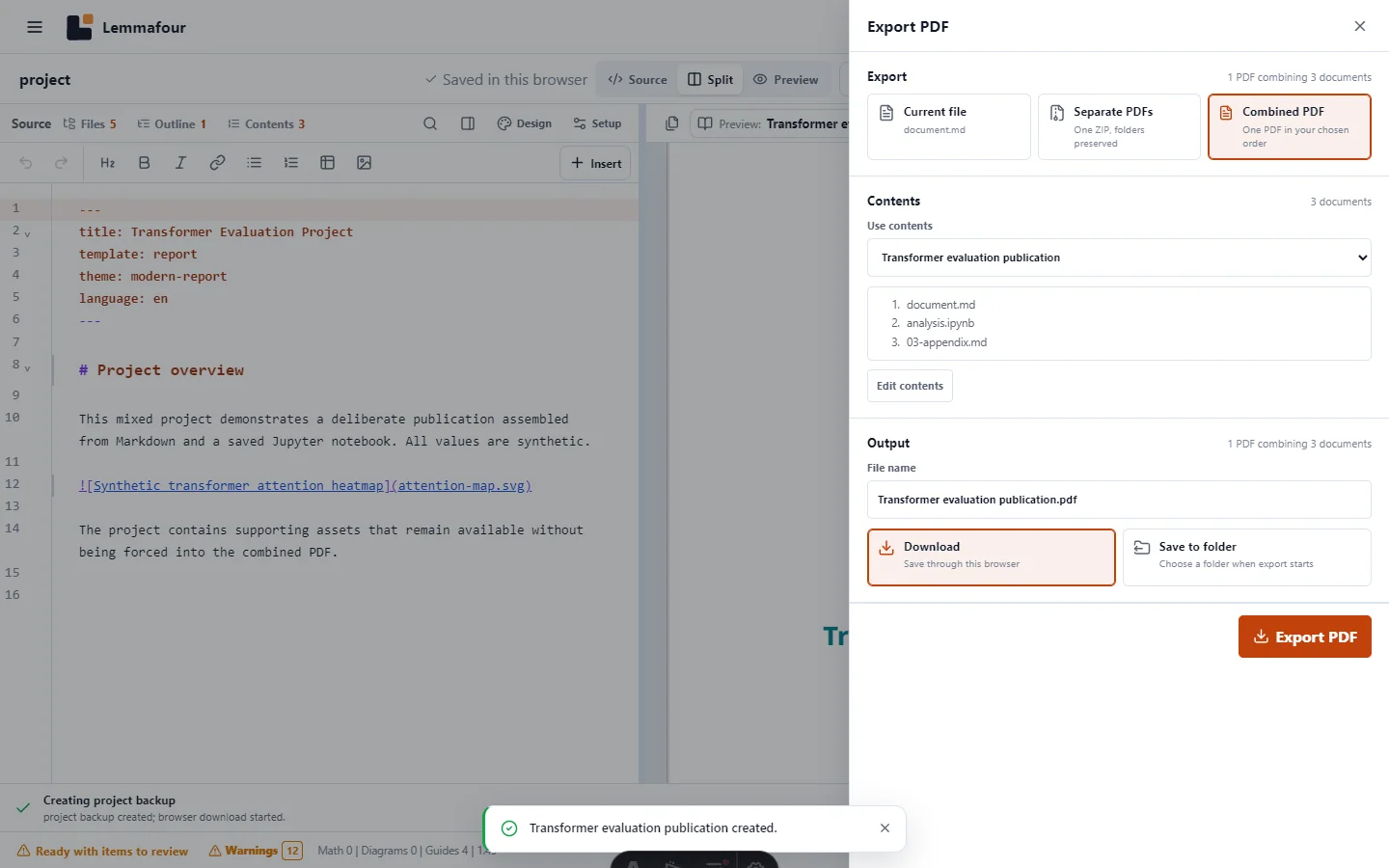
A project answers what files are available. A preview answers what you are inspecting now. Export answers what deliverable you want to save. Keeping those three decisions separate prevents a supporting note, bibliography, or draft from entering a client PDF merely because it shares the same folder.
Lemmafour offers three PDF outcomes when a project contains more than one publishable document: Current file, Separate PDFs, and Combined PDF. Choose according to what the recipient needs, not according to how the source happens to be stored.
Current file: one source, one PDF
Choose Current file when the open Markdown document or notebook is the complete deliverable. This is appropriate for a single report, a notebook results summary, one application attachment, or a chapter being reviewed independently.
The output filename follows the current source by default. You can change it before export. Supporting files such as images and a bibliography still participate in compilation, but they do not become independent pages simply because the project contains them.
This is also the fastest way to verify a correction. Open the relevant document, update the preview, and export that PDF without processing unrelated project documents.
Separate PDFs: several documents that must remain separate
Choose Separate PDFs when several project documents belong to the same delivery but must remain individual files. Examples include a cover letter and CV, a set of assignment handouts, or reports sent to different reviewers.
The export panel shows a checklist of publishable documents. Select only the files you intend to deliver. Each selected source is compiled independently using the current project publication settings. The resulting PDFs are placed in one ZIP so the browser can deliver them through a single download.
This mode does not flatten folders or merge page sequences. It preserves the distinction between files. If one source fails while others succeed, the export result can report the skipped file rather than pretending the package is complete.
Combined PDF: one ordered publication
Choose Combined PDF for a book, manual, dossier, thesis package, or report whose sections must be read as one document. The contents are explicit and ordered. Each source document begins on a new page, so a later chapter does not start beneath the final paragraph of the previous chapter.
For work you will export repeatedly, create a named Combined PDF in Contents first. It becomes a reusable publication target with its own order. You can also use a custom selection in the export panel for a one-time result.
The project may contain several named publications. For example, the same sources can support a short review copy and a complete archival copy without duplicating the Markdown files.
Preview selection is not an accidental export command
Previewing a document should not silently redefine the project. Likewise, previewing a named combined publication should not make every later download combined without confirmation.
The top of the PDF pane identifies the current preview target. Before relying on an export, check that the preview is current and that the export panel shows the intended mode, document count, order, and filename. For a named Combined PDF, Lemmafour uses the same compilation artifact for preview and export, preventing theme or table-layout logic from diverging between the two paths.
The tested fixture below contains Markdown, a saved notebook, references, and an image. Its combined contents include only the three intended document units. Download the resulting combined demonstration PDF or the separate-PDF ZIP to inspect the two different deliverables from the same project.
A practical decision rule
Use Current file when the reader asked for one document and the active source is that document.
Use Separate PDFs when several documents travel together but retain separate identities, filenames, or submission slots.
Use Combined PDF when order, continuous page numbering, chapter boundaries, shared navigation, or one-file delivery matters.
Do not choose Combined PDF merely because there are several files. A project is a workspace, not automatically a book. The explicit contents list is the contract that turns selected documents into one publication.
Before saving
- Confirm the target shown above the PDF preview.
- Resolve blocking errors and review warnings relevant to the deliverable.
- Open Export PDF and choose the output outcome.
- Check selected documents, combined order, and filename.
- Download through the browser, or use Save to folder where that browser supports direct folder access.
The original project remains unchanged. Export creates a new artifact; a project backup is a separate operation for preserving the editable workspace.