An application bundle is a particular kind of stressful. There are eight documents, a portal with a rulebook written for its own convenience, a size limit, a naming convention, and a deadline — and the failure mode is a rejection notice a week later with no explanation of which document caused it.
The work itself is not hard. Doing it in the wrong order is what costs the week.
Read the rules first, and write them down
Before touching a file, extract the actual requirements from the instructions. They are usually scattered across three pages:
- Format — nearly always PDF; some portals reject anything else
- Size — per file, or for the whole submission, or both
- Page limits — for specific documents like personal statements
- Order — some systems require a fixed sequence, or a specific document first
- File naming —
SURNAME_Firstname_Passport.pdfconventions are common and mechanically enforced - One file or many — whether they want a single merged bundle or separate uploads
- Recency — proof of address dated within three months, statements covering a named period
Write them into a checklist. Most rejections are compliance failures against something stated in the instructions, not judgements about your case.
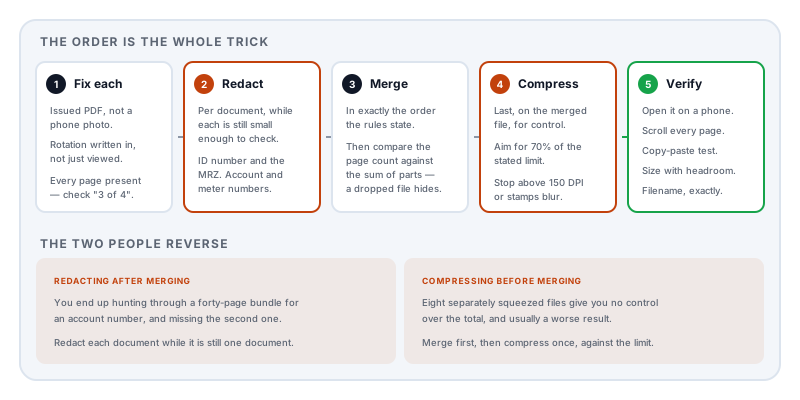
Step 1 — get each document into the right form
Prefer the issued PDF over a photograph. Banks, employers, universities and utilities almost all offer a PDF download. It is smaller, sharper, searchable, and it looks like an official document rather than something snapped on a kitchen table. A phone photo should be the last resort, not the first instinct.
If you must scan, scan properly. Flat, evenly lit, no shadow across the page, the whole document in frame including edges, and using your phone’s document mode rather than the plain camera so it deskews and crops. Aim for something legible at 200–300 DPI.
Fix orientation now. A sideways page is a rejection risk, and it is easier to fix per document than after merging. Note that viewer rotation is not saved — the rotation has to be written into the file.
Check each document is complete. Bank statements in particular are often downloaded a page short, and “page 3 of 4” with no page 4 is a common failure.
Step 2 — redact, before you merge
Do this per document, while each one is still small enough to check properly.
What to remove depends on the document and the requester — what to hide before you send a document has the document-by-document table. The most common items in an application bundle:
- Passport or ID copy — the document number and the machine-readable zone, which repeats it
- Bank statement — account and routing numbers; but note that if a lender is assessing affordability you generally should not redact transactions
- Payslips — national identification number and the itemised deductions
- Utility bill — account and meter numbers, and the usage graph
One caution specific to applications: check whether the receiving body requires unredacted documents. Identity and anti-money-laundering checks often do. Ask before you redact rather than after they refuse.
Step 3 — merge in the required order
If the portal wants one file, merge with Merge PDF in exactly the sequence the instructions specify. If they do not specify, use the order the instructions list the documents in — a reviewer working down their own checklist will thank you.
Two things to check afterwards:
Page count. Compare it against the sum of the parts. A silently dropped document is easy to miss in a forty-page bundle.
A cover or index page, if the bundle is long. Not always required, and it makes a reviewer’s job easier when it is not prohibited.
Step 4 — compress last
Compression comes after merging, because compressing eight files individually and then combining them wastes effort and gives you less control over the total.
If the bundle is over the limit, the cause is almost certainly scanned pages rather than text. Getting a PDF under an upload size limit covers which lever to pull: colour depth first, then resolution, then quality.
Aim for about 70% of the stated limit. Some portals measure the encoded upload rather than the file on disk, and base64 encoding adds roughly a third.
Do not over-compress. A reviewer who cannot read your certificate rejects it exactly as firmly as a portal that cannot accept it. Below about 150 DPI, stamps, signatures and small print start to fail.
Step 5 — verify before uploading
Five checks on the final file:
- Open it on a different device. Email it to yourself and open it on a phone. This catches fonts, rotation and corruption in one step.
- Scroll every page. Confirm nothing is missing, sideways, blank, or duplicated.
- Select all, copy, paste into a text editor. Confirm nothing you redacted appears.
- Check the size against the stated limit, with headroom.
- Check the filename against the naming convention, exactly — including case and separators.
Four things that get bundles rejected
Password protection nobody asked for. People add a password thinking it is prudent. Many portals cannot open encrypted PDFs, and automated processing fails silently. Unless the instructions request one, do not.
A photo where a scan was needed. Angled, shadowed, cropped at the edge, unreadable at the corners.
Over-compression that renders a stamp or signature illegible.
The wrong file entirely — the unredacted original, or last year’s statement. Keep your working files in a clearly named folder, and check what you are attaching.
Keep the originals
Keep an unredacted, uncompressed copy of every document in a separate folder until the application is decided. You will be asked for at least one of them again, often at short notice, and rebuilding a redacted document from a compressed bundle is not possible.
A note on where this happens
An application bundle is, by construction, the most sensitive collection of documents most people ever assemble: identity, income, address, education, and often health or family circumstances, gathered into one file.
Lemmafour’s tools run in your browser — redact, merge and compress all operate on your own device, and the bundle is written back to your disk. Given that the usual alternative is uploading exactly this collection to a free web service, it is worth doing the assembly somewhere it does not have to leave.
Sources and further reading
- ISO 32000-2:2017, the PDF 2.0 specification — page rotation, encryption, and image compression filters underlying every step above.
- RFC 4648 §4, base64 encoding — the roughly 33% inflation behind unexplained “file too large” rejections.
- Regulation (EU) 2016/679 (GDPR), Article 5 — data minimisation, the basis for redacting before submission.
- ITU-T T.6 and ITU-T T.88 — the bilevel compression schemes that make scanned bundles fit.