Someone needs to confirm your identity, so they ask for a copy of your passport or ID card. You do the sensible thing: you black out the document number before sending it.
It does almost nothing, and the reason is printed two inches below the number you just hid.
The machine-readable zone gives it all back
Look at the bottom of a passport photo page. Two lines of capital letters, digits and angle brackets in a distinctive squared-off typeface. On an ID card, usually three shorter lines on the back.
That is the machine-readable zone, and it is not decoration. It is defined by ICAO Doc 9303, the international standard for travel documents, and it is deliberately the most legible thing on the page — designed so that a border-control scanner can read it reliably in poor light at speed.
For a passport the format is called TD3: two lines of exactly 44 characters, at fixed positions, in a constrained character set. Within those 88 characters sit your document type, issuing country, name, document number, nationality, date of birth, sex, and expiry date — followed by check digits so a reader can confirm it decoded them correctly.
So when you cover the printed document number in the visual field and leave the MRZ intact, the number is still on the page, in plain text, at a known offset, with a check digit to confirm anyone has read it correctly. The same is true of your date of birth.
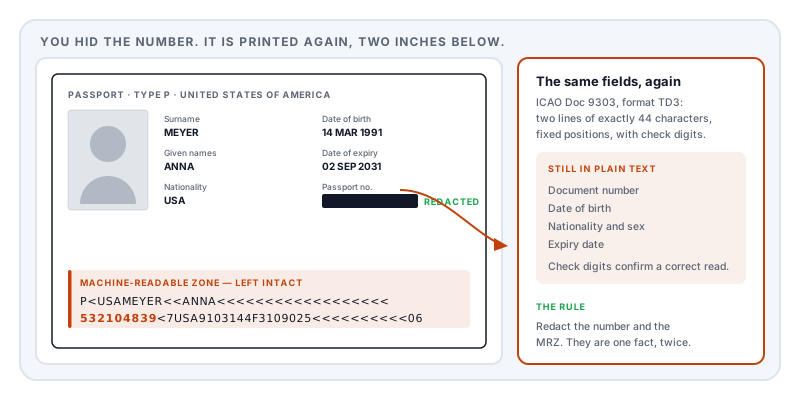
The fixed format makes it worse, not better. A human glancing at two lines of chevrons sees noise. Software sees a form with labelled fields.
If you redact the document number, you must redact the machine-readable zone as well. They are the same information twice.
What the recipient actually needs
It varies, and it is worth asking rather than assuming:
| Who is asking | Typically needs | Usually does not need |
|---|---|---|
| Hotel or car hire | Name, photo, expiry, nationality | Document number, MRZ, signature |
| Employer onboarding | Name, photo, right-to-work evidence | Personal number, place of birth |
| Bank or regulated firm (AML) | Often the complete page | — see the caution below |
| Landlord or agent | Name, photo, expiry | Document number, MRZ |
| Courier or delivery | Name only, usually | Almost all of it |
What to remove
- The machine-readable zone, in full — both lines, or all three on an ID card
- The document number wherever it appears in the visual field, which is often twice
- Your signature — a specimen signature is directly useful for forgery
- Personal number or national identification number, where the document carries one
- Place of birth, a classic security-question answer
- The barcode or QR code, if present, which usually encodes the same fields again
What to keep
- Your name, as it appears on the application
- The photograph, unless the check is not identity-based
- Nationality and document type
- The expiry date — most checks require the document to be current
Watermark the copy
This is the single most effective thing you can do and almost nobody does it.
Overlay text across the face of the copy stating what it is for, who it is for, and the date: “Copy provided to Harbour Lettings on 14 August 2026 for tenancy verification only.”
It costs nothing, it does not obstruct the check, and it makes the file substantially less useful if it is later leaked, resold, or reused for something else — because any subsequent recipient can see it was issued for a different purpose. Data protection regulators across Europe recommend the practice for exactly this reason.
Stamp PDF does this. Place it across the page rather than in a corner, at moderate opacity, so it cannot simply be cropped off.
The caution that matters
Identity verification required by law is the exception. A bank performing anti-money-laundering checks, an employer performing a right-to-work check, or a regulated firm onboarding you may need an unaltered copy, because completeness is part of what they are verifying. Some will accept a redacted copy; many will not.
Ask before you redact: “Can I redact the document number and machine-readable zone for this check?” If the answer is no, that is a genuine legal requirement rather than an inconvenience — and the right response is to be careful about the channel instead.
Note also that redacting a copy is different from altering the document itself. Defacing an actual passport is an offence in most jurisdictions. Nothing here suggests touching the physical document.
The mistakes that undo it
A black box drawn in a PDF viewer is not a deletion. Most viewers add it as a shape on top; the text stays in the file and is recoverable by selecting and copying. Covered in redaction vs whiteout.
A scan is pixels, not text — but it may have an OCR layer. If the copy was scanned and processed, there may be an invisible transcription behind the image, and it will have transcribed the MRZ perfectly, because the MRZ is designed to be machine-readable. Drawing over the picture does not touch it.
A phone highlighter is semi-transparent. Brightness and contrast adjustments recover what is beneath. Use a solid shape at full opacity, or redact the PDF properly.
Cropping the MRZ off leaves it in the file. Crop changes what is displayed, not what exists.
A note on the width of the box
If a redaction box is exactly as wide as what it replaced, the width measures the content. Researchers at the Privacy Enhancing Technologies Symposium in 2023 recovered redacted names from published government documents by matching candidates against the character positioning that survived, and found the leak in all eleven tools they tested.
A document number drawn from a known national format is exactly the kind of small, guessable value this applies to. Quantising the box width removes the measurement.
Check before you send
- Select all, copy, paste into a plain text editor. Search for your document number and your date of birth in every format.
- Zoom to the foot of the page. Is the MRZ genuinely gone, or greyed?
- Read the document properties for a scanner-written reference.
- Check the second page, if you scanned a spread — the number often appears again.
Doing it
Redact PDF removes the selected text and image content and rewrites the file rather than covering it — which matters here because an ID copy is usually a scan, so the MRZ has to be removed as an image area rather than as selectable text. Metadata, attachments and comments are cleared in the same pass, and a second engine re-reads the export to confirm nothing remains extractable.
It runs in your browser. For a document that is the master key to your identity, not uploading it to a stranger’s server in order to protect it is the whole point.
Sources and further reading
- ICAO Doc 9303, Machine Readable Travel Documents — the international standard defining the MRZ, its fixed field positions, character set and check-digit algorithm. Part 1, consolidated text.
- Regulation (EU) 2016/679 (GDPR), Article 5 — data minimisation, the basis for providing only what the check requires.
- Bland, M., Iyer, A. and Levchenko, K., Story Beyond the Eye: Glyph Positions Break PDF Text Redaction, PoPETs 2023(3):43–61.
- NIST SP 800-122, Guide to Protecting the Confidentiality of Personally Identifiable Information — identifier risk ranking.
- ISO 32000-2:2017, the PDF 2.0 specification — image XObjects and content streams: why a scanned ID needs area redaction.