A professional PDF is not created by making every heading larger or choosing a decorative theme. It comes from a stable document model: headings form navigation, figures and tables have identities, claims point to references, notes remain attached to their markers, and layout decisions survive when the text changes.
Markdown can express that model without turning the source into a page-description language. Lemmafour parses the document structure, resolves local assets and references, plans the page, and sends one semantic project through the same Typst-based compilation path used by preview and export.
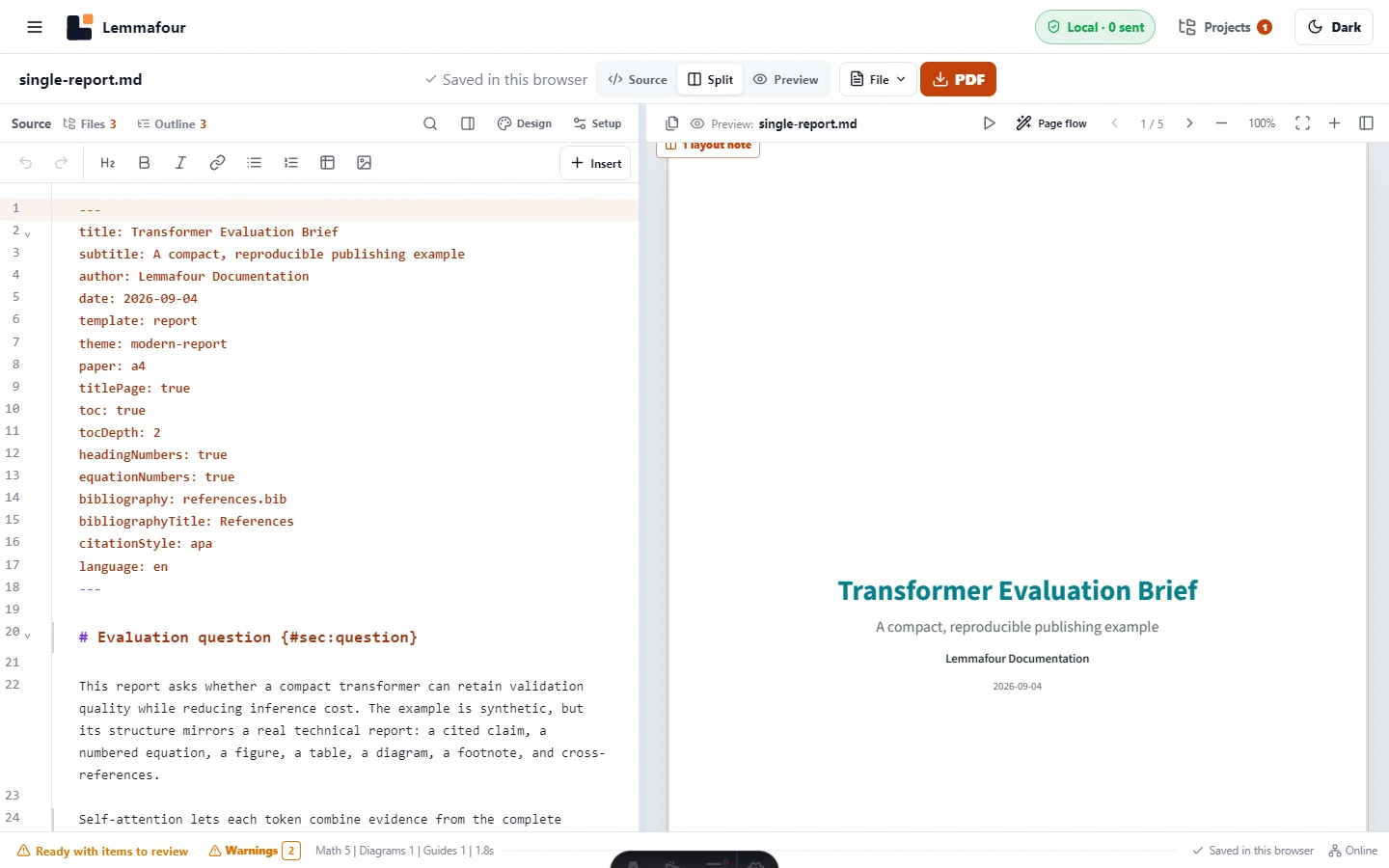
Download the tested source package or inspect the resulting Transformer Evaluation Brief PDF. The example contains synthetic content and one bibliographic record; it does not depend on a remote service.
Begin with document metadata
Frontmatter identifies the document and controls publication-wide behavior:
---
title: Transformer Evaluation Brief
author: Lemmafour Documentation
template: report
paper: a4
titlePage: true
toc: true
headingNumbers: true
equationNumbers: true
bibliography: references.bib
citationStyle: apa
language: en
---
The title, author, date, and language are document facts. Contents, numbering, paper size, and bibliography are publication choices. Keeping them in frontmatter makes the source portable and prevents each heading from carrying layout instructions.
Keep the bibliography inside the project
Place a BibTeX/BibLaTeX or supported Hayagriva bibliography beside the document, or reference it with a project-relative path. Cite a record with its key:
Self-attention combines evidence from the complete sequence [@vaswani2017].The key must exist in the declared bibliography. A misspelling should produce a diagnostic and candidate rather than a made-up citation. Local bibliography resolution also means the same source can be rebuilt offline and does not expose a reading list to a remote citation service.
Give important objects stable identities
Labels let prose refer to meaning instead of a page number that changes during layout:
:::equation{#eq:attention alt="Scaled dot-product attention"}
\[
\operatorname{Attention}(Q,K,V)=
\operatorname{softmax}\left(\frac{QK^T}{\sqrt{d_k}}\right)V
\]
:::

The operation is shown in @eq:attention.
Use fig:, tbl:, eq:, lst:, and sec: prefixes consistently. The renderer can number the object, create a PDF destination, and update every reference when sections move. Duplicate or unresolved labels remain visible diagnostics.
Figures need useful alternative text and captions. Tables need real headers and, when their reading order is not obvious, a summary. Those are semantic requirements, not decorations added after pagination.
Use layout instructions at structural boundaries
Ordinary prose should flow under the selected theme. Add a structured region only when the content demands it:
:::columnsfor a sustained multi-column section;:::widefor an object that must span columns;:::landscapefor a page whose relationships require extra width;::pagebreak[]for a deliberate document boundary;:::keepfor a short unit that becomes misleading when split.
Automatic table and figure placement is a good starting point. Manual controls should express the author’s intent, not repair arbitrary coordinates. A large table may use the page width while a long table continues over pages with repeated headers.
Notes, contents, and PDF navigation
Markdown footnotes remain linked to their markers. A generated table of contents follows the heading hierarchy and depth; PDF bookmarks provide corresponding reader navigation. If a heading level is skipped, correct the source hierarchy rather than changing only its font size.
For a thesis or long report, also review title-page conventions, abstract placement, front matter, list-of-figure requirements, page numbering, and the institution’s submission profile. Getting a thesis past submission checks covers that workflow without duplicating it here.
What is free and what is professional
The free core includes ordinary Markdown and supported static dialects, saved notebook publishing, mathematics, Mermaid diagrams, tables, code, citations, footnotes, local assets, basic themes, preview, and ordinary PDF export without an account or daily task quota.
A Day Pass or Pro adds professional themes and font pairs, exact type-scale and spacing controls, reusable branding, named publication editions, delivery packages, and standards-targeted output profiles. The source content does not become paid merely because it contains an equation or bibliography.
The distinction is output control. A user can prove the workflow and create a useful PDF first; payment applies when a professional delivery requires the advanced presentation or assurance layer. The current pricing comparison is the source of truth for those gates.
Accessibility, PDF/A, and printing are separate checks
A visually polished PDF can still have weak reading order or missing descriptions. Continue with making a PDF a screen reader can read when accessibility matters.
PDF/A concerns long-term self-containment and archival restrictions; it is not a synonym for accessibility. What PDF/A is and why an institution wants it explains the difference. Standards-targeted output should be independently validated when a recipient requires it.
Finally, screen appearance does not guarantee physical output. Paper dimensions, margins, image resolution, color, and printer scaling still need review using the PDF printing checklist.
A reliable finishing sequence
- Resolve missing assets, labels, and citation keys.
- Review warnings about captions, alternative text, table headers, and language.
- Confirm heading order and PDF navigation.
- Inspect wide objects and page breaks at normal reading size.
- Export the exact current preview target.
- Run any institution-required accessibility, archival, or print validation outside the visual review.
The goal is not to imitate a word processor’s canvas. It is to keep a readable source while producing a document whose structure and page composition remain dependable as the project grows.